

One image for every product, without designing each one
Catalogue ads usually show just the product photo. A Basketly template adds the price, discount, your logo and a headline, and the feed swaps the photo for the finished image, so Meta and Google ads use it on their own.
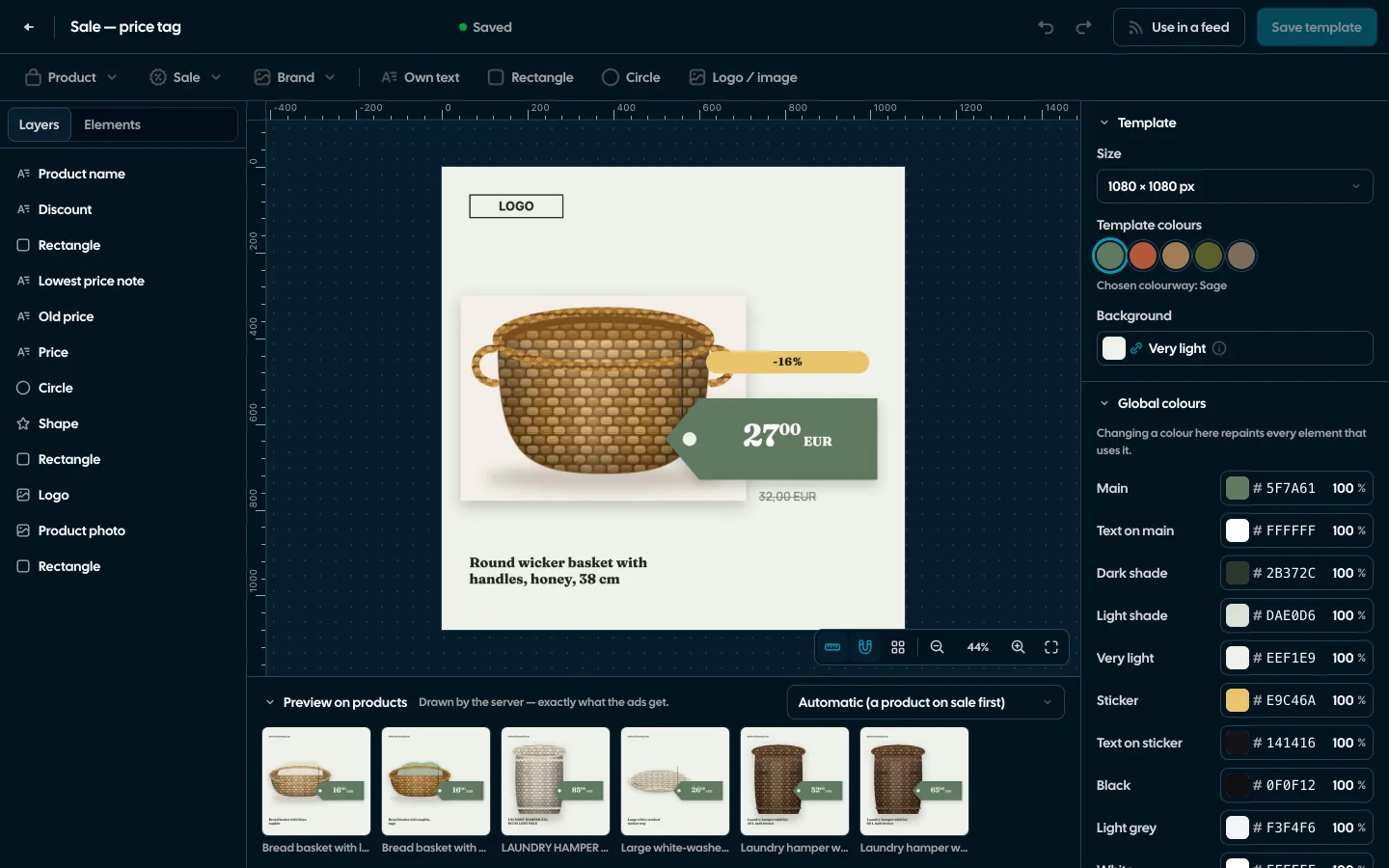
Screenshots from a demo organisation. People and numbers are fictional.
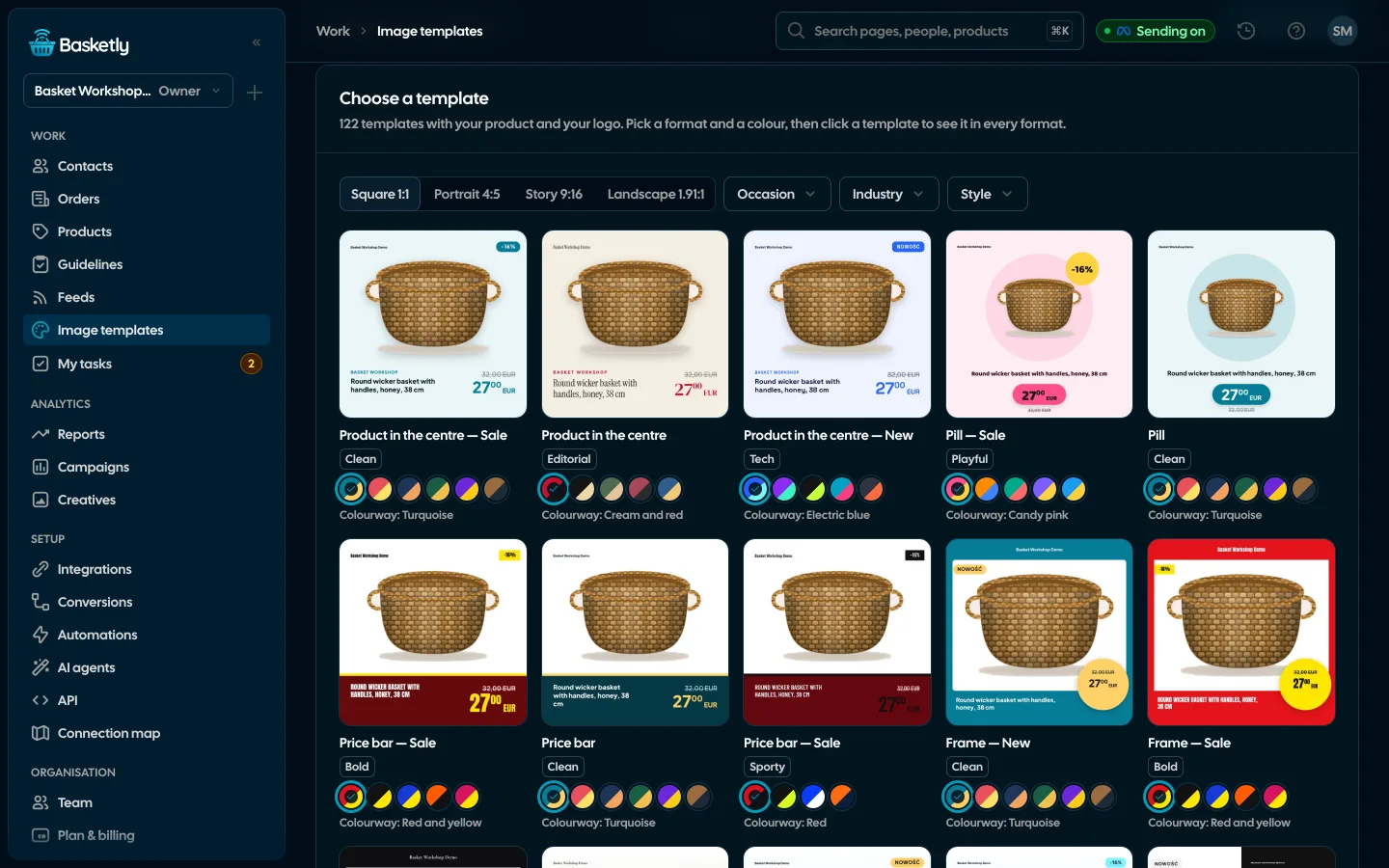
A gallery of ready designs
122 designs, each in four formats. Thumbnails are drawn with your own product and logo, and a click makes your shop’s copy and opens the editor.
Square
1080 × 1080
Portrait
1080 × 1350
Story
1080 × 1920, text kept out of the top 14% and bottom 22% that Instagram and Facebook cover.
Landscape
1200 × 628, e.g. for Performance Max.
Occasions and styles
Filters by occasion, industry and style. Designs lead with the price alone, a discount, “New”, “Bestseller”, free delivery, or a date of the Polish retail calendar.
- Black Friday, Cyber Monday, Christmas, Valentine’s Day, Mother’s Day and more
- 11 style kits: typefaces, corner rounding and colourways of their own
- The product photo trimmed to the product, and in library designs cut out of its background
- The lowest price of the 30 days before the reduction (Omnibus), when the product has it
An editor like a graphics app
Layers, a canvas with rulers, grid and snapping, a library of ready elements (promo stickers, prices, buttons, shapes), gradients, textures, photo filters and blend modes. Texts are templates with product fields such as name, price or discount.
- 28 typefaces with Polish letters
- Conditions on an element: show, hide or change it when the product is on sale
- A preview on 6 products, drawn on the server exactly like the ad images
- The editor needs a computer, 1024 px wide or more
From Figma to a template
A link to a Figma frame makes a new template. Layer names pick the fields: “photo” is the product photo, “title” the name, “current_price_text” the price, and a layer named “sale” shows only on sale. A sample .fig file is in the import dialog.
The image reaches ads through the feed
The feed rule “Image from template” swaps the product photo for the address of an image drawn from the template. The address changes with the template and the product, so Meta and Google fetch the new version.
See product feeds- 1
Template
A gallery design, your own or one from Figma.
- 2
Feed rule
Replaces the photo or adds the first additional image.
- 3
Catalogue
Meta and Google read the feed with the image address.
- 4
Results in ads
A tab of its own: impressions, clicks, CTR and spend of each template’s feed products over 7, 30 or 90 days.
A template’s results count every product of the feeds that use it. They compare templates; they do not prove the image changed a particular product’s result.
No. The feed serves the image address, and Meta and Google fetch it when they read the catalogue. Each version is drawn once and kept 14 days after its last request.
Up to 50 templates per organisation, 150 elements per template, sides from 200 to 2,000 px.
Discount badges and the struck price hide on their own. You can also set your own conditions: show, hide or change an element depending on a product field.
Related features
- Product feedsYour shop’s feed fixed automatically and by your rules, every product diagnosed against Google Merchant Center and Meta catalogue requirements, served at its own address.See details
- Product statisticsImpressions, clicks and spend of every product in Meta catalogue ads, next to views, carts and sales in your shop.See details
- Orders and buyersEvery shop order with its lines and state, revenue, average basket, new and returning buyers, and 24 months of history.See details
- Sales reportOne sentence on how the shop is doing, the six key figures and conclusions with a next step — and tabs below, each answering one question. Every number with its truth level: the shop, a platform or the last click.See details
- ConversionsShop purchases sent server-side to Meta and seven more platforms, and a day-by-day balance: how many orders, how many purchases accepted and where something got lost.See details
- For agenciesA separate workspace for every client shop, roles, an all-clients overview and a job queue for each.See details


Get started in under 5 minutes
Connect your shop and Meta and see how many purchases really arrive.
- Free up to 100 orders a month
- No developer needed
- Purchase balance and self-check