

Every order from your shop, unpaid ones too
Basketly keeps the orders of your connected shop (Shoper today) with their lines, state and buyer. Paid ones go to Meta as purchases, and all of them stay in the panel for analysis.
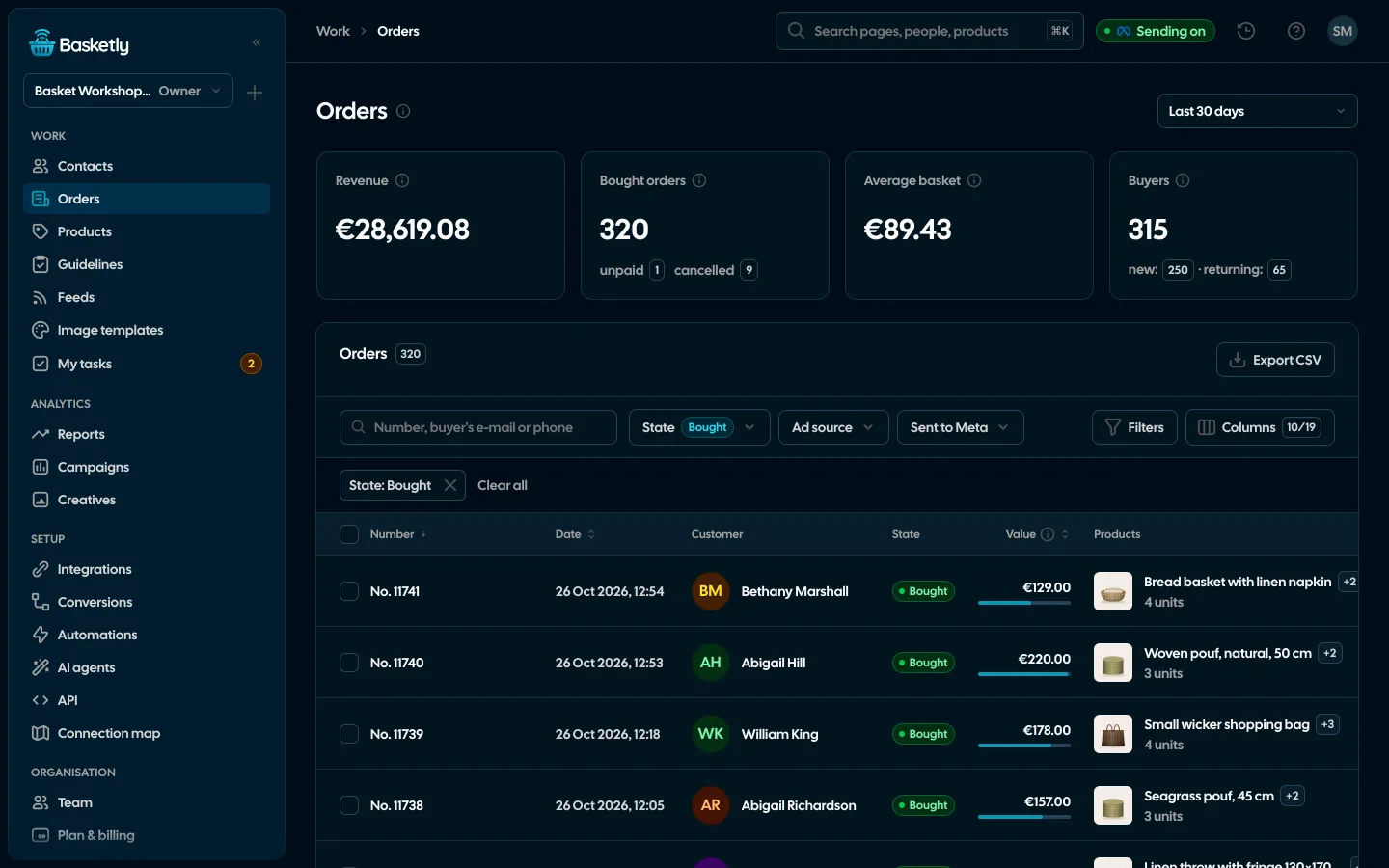
Screenshots from a demo organisation. People and numbers are fictional.
What the Orders page shows
A period (today, 7, 30 or 90 days, 12 months or a custom range) and four tiles for the whole selection. Below them a table of orders: columns to pick (customer, shop, state, value, products with a photo, ad source, purchase sending to Meta and other platforms, country), sorting, filters by state, shop, status, value, ad, Meta sending, product and country, search by number or the buyer’s e-mail or phone, and a CSV of the checked rows.
Revenue
From bought orders, per currency.
Bought orders
With unpaid and cancelled beside them, so you see how many drop off.
Average basket
Revenue divided by the bought orders of the period.
Buyers
New (first bought order in the period) and returning.
An order with every line
A click opens the order: state and the shop’s status, value, shipping, city and country, and every line with name, variant, code, EAN, quantity and price. A line whose id matches a catalogue product opens that product’s record.
- Bought means paid, or with a status the connection counts as paid (e.g. cash on delivery)
- Cancelled and unpaid orders are kept but do not count towards revenue
- Next to the order: the buyer’s totals and “Open client card”
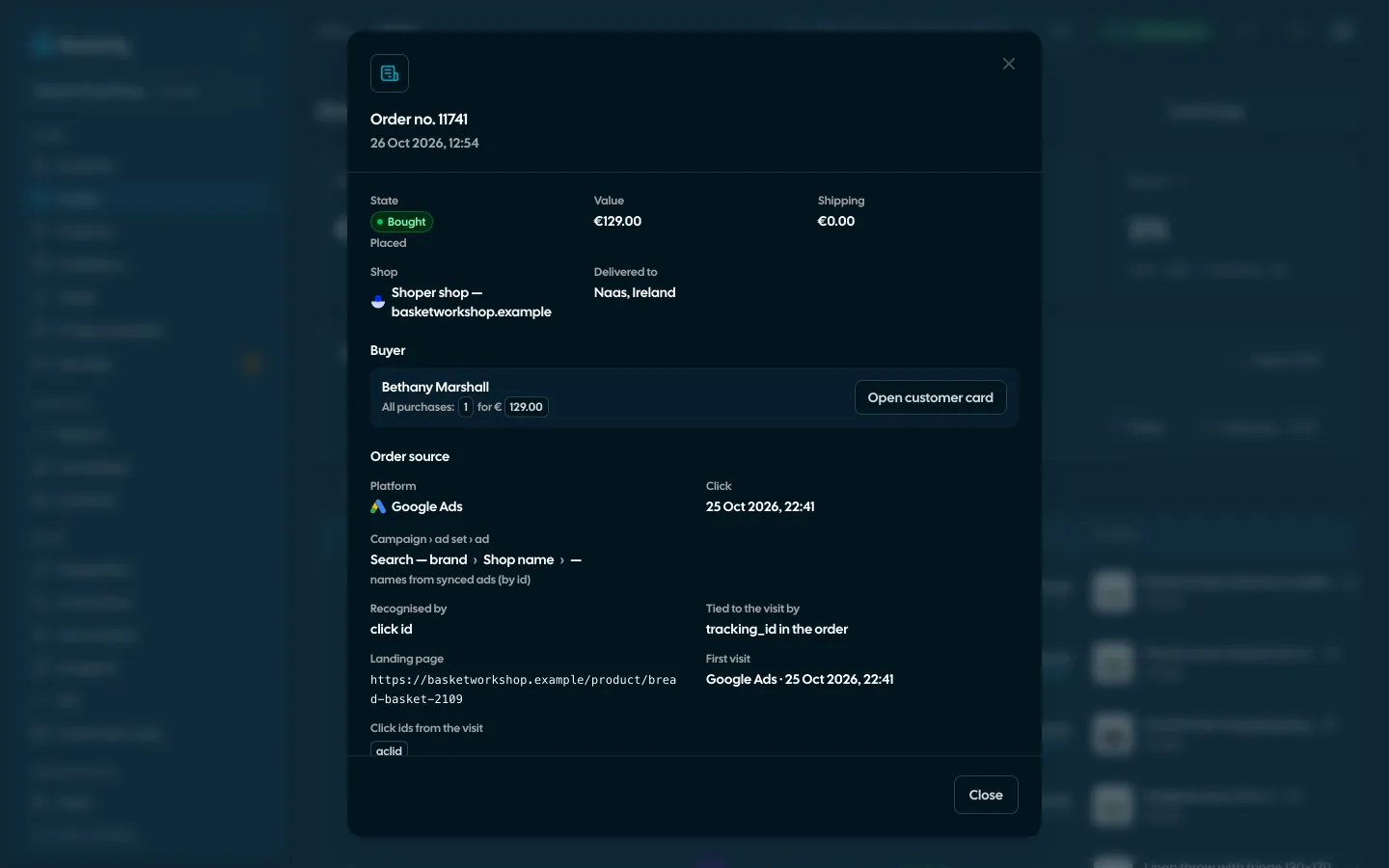
Where the order came from
Next to every order Basketly shows its source: the channel (Meta, Google Ads, Microsoft Ads, TikTok, Pinterest, ChatGPT Ads, e-mail, price comparison sites, other, direct visit or unknown), campaign, ad set and ad, the UTM parameters and the click time. It is our reading of the last ad click in the buyer’s visits, not Meta’s attribution, so on Campaigns “Orders (Basketly)” sit next to “Purchases (Meta)” and are never added up.
- The table has a Source column (channel logo and name) next to the Campaign from the ad column, and filters by platform, campaign and whether the source is known
- E-mail is recognised by utm_medium (email, newsletter) or a source such as Klaviyo, Mailchimp, GetResponse, FreshMail, Brevo; comparison sites by a source such as Ceneo, Skąpiec, Nokaut, Okazje, Idealo
- Campaign and ad names are matched with the ads read from Meta, Google Ads, Microsoft Ads, TikTok, Pinterest and ChatGPT Ads
- The “Orders by source” bar and each channel’s orders in Reports and Campaigns are counted from these sources
- The order shows which click ids its purchase carried to each platform
- Works with the shop script (after consent), URL parameters in your ads and a call on the thank-you page
The buyer joins your customer list
The buyer becomes a person in Clients, matched by phone, then by e-mail. When an order becomes bought, their card gets an “Order” line, and “Shop purchases” shows the number of orders, their value and the latest five.
See the customer list- 1
Order in the shop
Shoper sends a webhook, and every 15 minutes we also check for status changes.
- 2
Saved in the panel
The order with its lines and state, paid or not.
- 3
A person in Clients
Matched by phone, then e-mail. Assign an owner by hand or with an automation.
- 4
Purchase to Meta
Only a paid order goes to Meta as a purchase, once.
24 months of history
Once the shop is connected, a background job reads the orders of the last 24 months once, oldest first. An interrupted read continues where it stopped. Nothing from it is sent to Meta: it feeds reports, segments and product statistics.
- Current orders: webhook plus a read every 15 minutes
- History: once per connection, nothing sent to Meta
- Progress shows in Background jobs
Orders come from Shoper today. IdoSell, WooCommerce, Shopify and BaseLinker are planned, and the panel shows them as planned, not as working.
Only paid ones (or with a status the connection counts as paid, e.g. cash on delivery), as a purchase with value, currency and product ids. Orders from the history import are not sent, and Meta accepts purchases at most 7 days old anyway.
Not for orders. In Integrations you enter the login and password of a Shoper API user; Basketly creates its webhook in the shop and reads orders and products. The shop script (after consent) is needed for product views and carts in product statistics and for the order source: it remembers the ad click, and calling baskety.linkOrder() on the thank-you page ties it to the order.
No. It is our reading: the last ad click in that buyer’s visits. Meta counts purchases its own way (other windows and models), so we show both numbers side by side and never add them up. The source also lets each platform get its purchase with its own click id.
Anyone who can view Clients. A role limited to “only own” sees the orders of its own customers.
Related features
- Client listEvery buyer as one person: shop purchases, history, purchase filters, owner, tasks and a data retention period.See details
- Segments and audiencesReady-made and saved customer segments by purchases, and a segment as a Meta custom audience that updates every night.See details
- AutomationsA paid order, a customer who stopped buying, a shop alert: e-mail the team, create a task, send a text or a webhook, built in a visual editor without code.See details
- Product feedsYour shop’s feed fixed automatically and by your rules, every product diagnosed against Google Merchant Center and Meta catalogue requirements, served at its own address.See details
- Sales reportOne sentence on how the shop is doing, the six key figures and conclusions with a next step — and tabs below, each answering one question. Every number with its truth level: the shop, a platform or the last click.See details
- ConversionsShop purchases sent server-side to Meta and seven more platforms, and a day-by-day balance: how many orders, how many purchases accepted and where something got lost.See details


Get started in under 5 minutes
Connect your shop and Meta and see how many purchases really arrive.
- Free up to 100 orders a month
- No developer needed
- Purchase balance and self-check