

Customers grouped by how they buy
Shop orders tell you who bought once, who comes back and who stopped buying. Basketly turns that into segments with a people count, and any segment can feed a Meta audience.
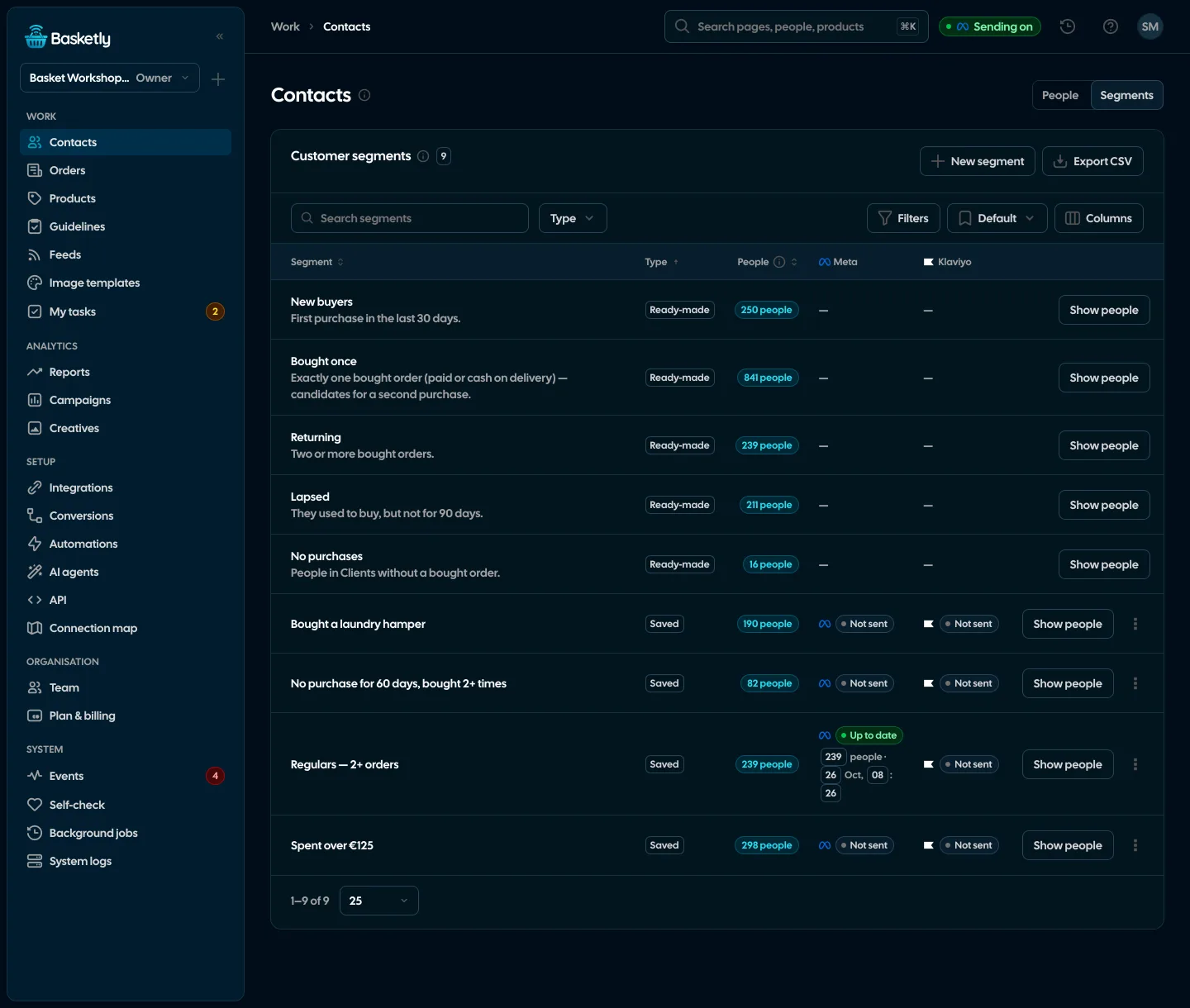
Screenshots from a demo organisation. People and numbers are fictional.
Five ready-made segments
They work as soon as the shop has orders. The people count of each segment depends on who looks: a role limited to “only own” sees its own clients.
New buyers
First purchase in the last 30 days.
Bought once
One bought order.
Returning
Two orders or more.
Lapsed
No purchase for 90 days.
No purchases
People on the list who never bought.
Your own segment from list filters
On the Clients list you set filters and click “Save as segment”. The segment keeps the filters, and “Show people” opens the list with them. Up to 50 segments per organisation.
See the client list- Number of bought orders and amount spent: at least, at most
- Last purchase within 30, 90, 180 or 365 days, or bought before but not for 30 to 365 days
- First purchase within 30 or 90 days, and a specific product bought
- Plus the list’s own filters: status, owner, tags, source, date added
A segment as a Meta audience
An owner or admin clicks “Send to Meta”, picks an ad account and confirms the legal basis. From then on the audience updates itself.
- 1
First send
A customer list (custom audience) is created in Meta with hashed e-mail and phone.
- 2
Only the difference
Later sends add people who joined the segment and remove those who left it.
- 3
Nightly and on change
A sync at 04:37 and after every change of the segment’s filters.
- 4
Stop
“Stop updating” ends the sync, and the audience stays in the ad account.
Before you send
A few rules worth knowing before the first audience.
| Rule | What it means |
|---|---|
| E-mail and phone hashed with SHA-256 | Meta gets hashes, not plain data |
| People without e-mail and phone | Are not sent |
| Up to 200,000 people | In batches of 10,000 |
| ads_management permission and Meta’s terms | If one is missing, the panel says so in plain words |
A Meta audience is a list to target ads at. Sending it says nothing about how Meta matches it or how the campaign will perform.
To Klaviyo, yes: a segment becomes a Klaviyo list updated every night (people added by e-mail, marketing consent unchanged). To Google, not yet.
At the next sync (nightly or after a filter change) they leave the Meta audience. We send only the difference: who joined, who left.
An owner or admin of the organisation, after confirming the legal basis. We store who confirmed it and when.
Related features
- Orders and buyersEvery shop order with its lines and state, revenue, average basket, new and returning buyers, and 24 months of history.See details
- Client listEvery buyer as one person: shop purchases, history, purchase filters, owner, tasks and a data retention period.See details
- AutomationsA paid order, a customer who stopped buying, a shop alert: e-mail the team, create a task, send a text or a webhook, built in a visual editor without code.See details
- Product feedsYour shop’s feed fixed automatically and by your rules, every product diagnosed against Google Merchant Center and Meta catalogue requirements, served at its own address.See details
- Sales reportOne sentence on how the shop is doing, the six key figures and conclusions with a next step — and tabs below, each answering one question. Every number with its truth level: the shop, a platform or the last click.See details
- ConversionsShop purchases sent server-side to Meta and seven more platforms, and a day-by-day balance: how many orders, how many purchases accepted and where something got lost.See details


Get started in under 5 minutes
Connect your shop and Meta and see how many purchases really arrive.
- Free up to 100 orders a month
- No developer needed
- Purchase balance and self-check