

Your shop tells you when something important happens
You build an automation from blocks in a visual editor: a trigger, logic and actions. Every run keeps a step-by-step history with results, and a failed step is retried with one click.
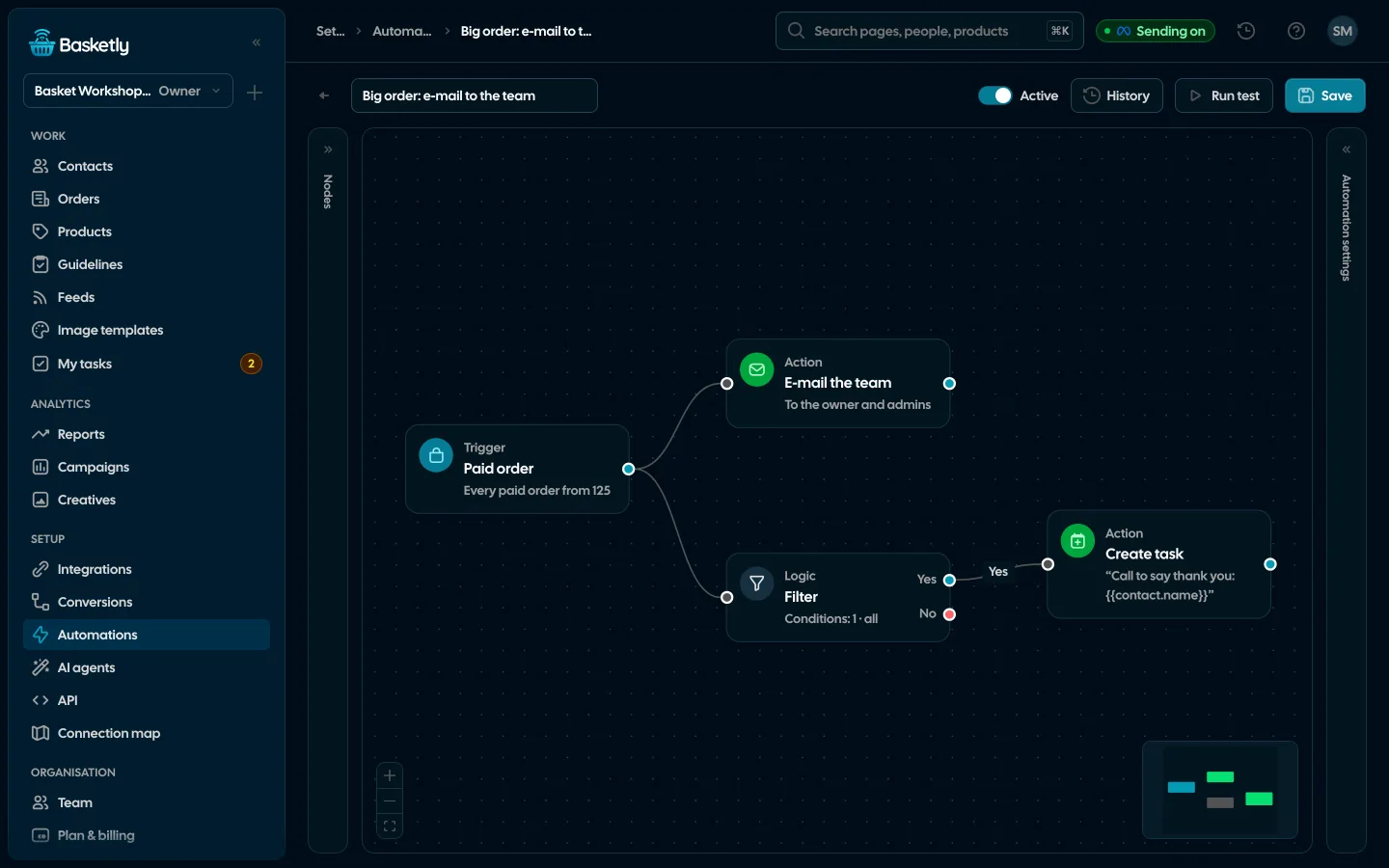
Screenshots from a demo organisation. People and numbers are fictional.
Three shop triggers
They start only on events after the automation is switched on, so importing order history never messages anyone.
Paid order
Once per order from the last 24 hours: every one, the customer’s first or their next one, optionally from a value.
Customer stopped buying
When the last purchase turns 30, 60, 90, 180 or 365 days old. Once per person and last purchase.
Shop alert
Hourly: purchases refused by Meta or another platform, paid orders with no purchase accepted, a feed that failed to download.
Ready templates
Start the three shop automations from a template and change whatever you like.
- 1
E-mail about a large order
Paid order of 500 or more → e-mail to the team.
- 2
Win back a lapsed customer
90 days without a purchase → a task for the owner.
- 3
Purchases not arriving
Shop alert → e-mail to the team describing the alert.
E-mail the team
The action sends a message to the organisation’s owner and admins or to up to 5 typed addresses, never to the shop’s customers. Subject and text take variables such as {{order.number}}, {{order.total}}, {{buyer.days}} or {{alert.text}}.
- One message per recipient, not repeated when the step is retried
- Subject up to 200 characters, text up to 5,000
- Sent through a durable e-mail queue
Other triggers
An automation can also start on events in the client list or from your own system.
Status change
When a customer gets a chosen status or any status.
Task overdue
A reminder or an escalation.
Inbound webhook
From your system, with a token or an HMAC signature.
Manual
With “Run test”, before you switch the automation on.
Logic and actions
Personal data in runs is encrypted and erased after 30 days.
Filter
LogicOnly runs that meet the condition go on.
Set fields
LogicValues for later steps.
Wait
LogicFrom a minute to 30 days.
E-mail the team
ActionTo the owner and admins or typed addresses.
Send SMS
ActionThrough your SMS account, between 08:00 and 20:00.
Send webhook
ActionHTTPS only, with an HMAC signature.
Create task
ActionA task with a due time for the owner or a chosen member.
Save to CRM
ActionThe person from the trigger’s data joins the client list.
Assign owner
ActionA chosen team member becomes the customer’s owner.
Texts through your provider or your phone
Connect an SMSAPI or Twilio account, any gateway with a JSON API, or an Android phone through smsportal.app. Texts go out only between 08:00 and 20:00, at most 500 a day, and never to numbers on the “Do not text” list.
How to connect smsportal.app- smsportal.app: texts from your own number, at your mobile plan’s price
- A “STOP” reply puts the number on the “Do not text” list
- A retry after an SMSAPI error never sends a second text
Before switching on an automation with a text or a webhook, an admin confirms the legal basis for passing on personal data. Steps run only when the server has automation sending switched on.
By text, yes, through your SMS account. The e-mail action writes only to your team, never to shop customers. Marketing e-mails to customers stay in your newsletter tool.
No. “Paid order” starts only for orders placed in the last 24 hours and after the automation was switched on. “Customer stopped buying” counts crossings from the moment it is on, at most a week back.
Every hour it checks the last 24 hours, and the same alert is sent at most once a day. Paid orders without accepted purchases count from 3.
Whatever your provider charges. Through smsportal.app a text goes from your phone and costs what your mobile plan does. Basketly adds nothing for messages.
Related features
- Orders and buyersEvery shop order with its lines and state, revenue, average basket, new and returning buyers, and 24 months of history.See details
- Client listEvery buyer as one person: shop purchases, history, purchase filters, owner, tasks and a data retention period.See details
- Segments and audiencesReady-made and saved customer segments by purchases, and a segment as a Meta custom audience that updates every night.See details
- Product feedsYour shop’s feed fixed automatically and by your rules, every product diagnosed against Google Merchant Center and Meta catalogue requirements, served at its own address.See details
- Sales reportOne sentence on how the shop is doing, the six key figures and conclusions with a next step — and tabs below, each answering one question. Every number with its truth level: the shop, a platform or the last click.See details
- ConversionsShop purchases sent server-side to Meta and seven more platforms, and a day-by-day balance: how many orders, how many purchases accepted and where something got lost.See details


Get started in under 5 minutes
Connect your shop and Meta and see how many purchases really arrive.
- Free up to 100 orders a month
- No developer needed
- Purchase balance and self-check