

Ask an AI assistant about sales, products and campaigns
Connect Basketly to Claude, ChatGPT or another assistant. Ask in plain words: "what did we sell this week and what did the ads cost", "which products do my ads skip", "did every purchase reach Meta". The assistant sees what you see in the app and never sends conversions.
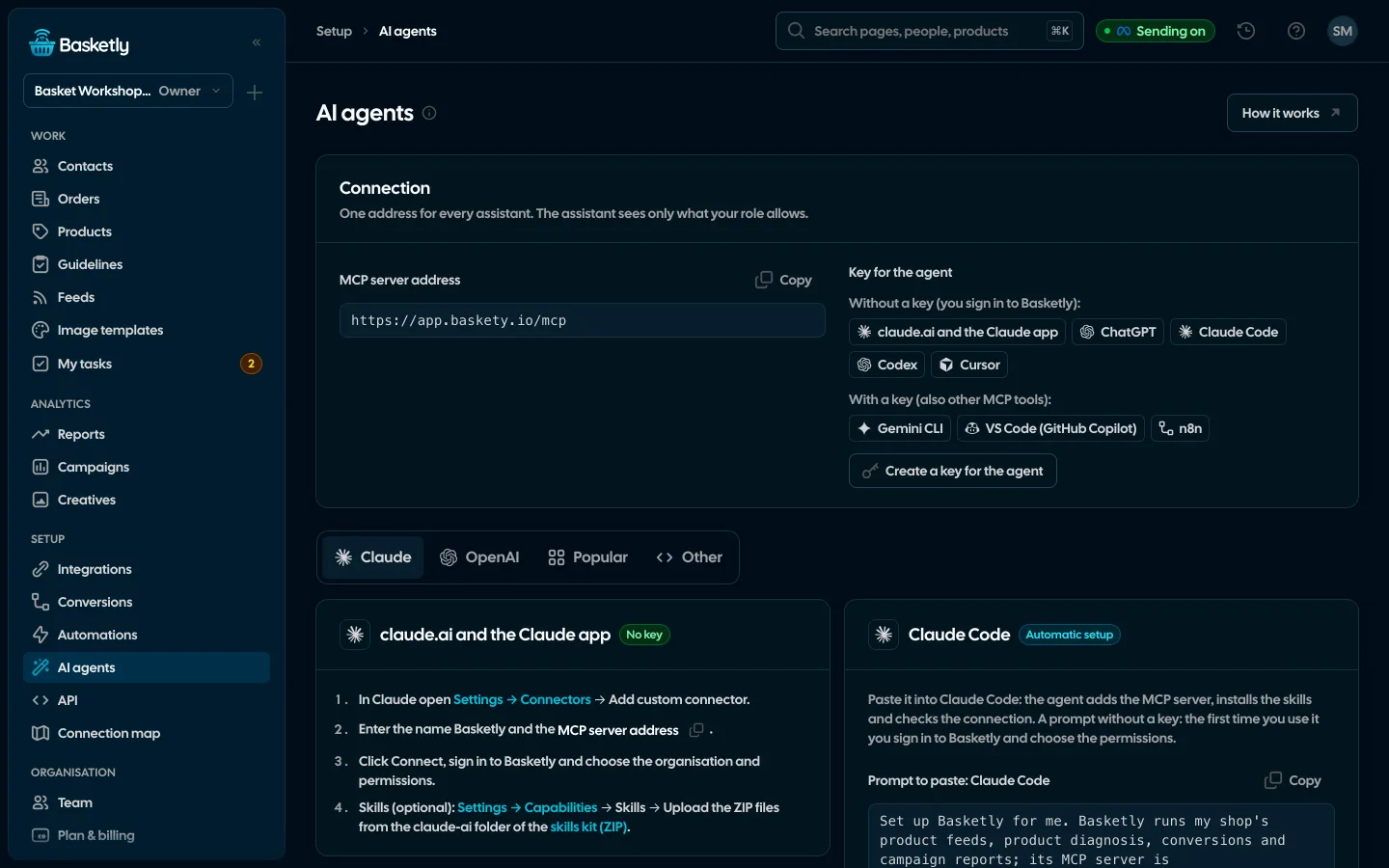
Screenshots from a demo organisation. People and numbers are fictional.
You ask your way, the assistant reaches into the app
The assistant uses the same data and permissions as you. It reads orders, products, feeds and reports, and writes only what you ask for.
Unseen products in one question
The assistant reads product statistics and shows what catalogue ads skip although it sells. Ask, and it makes a separate feed of them.
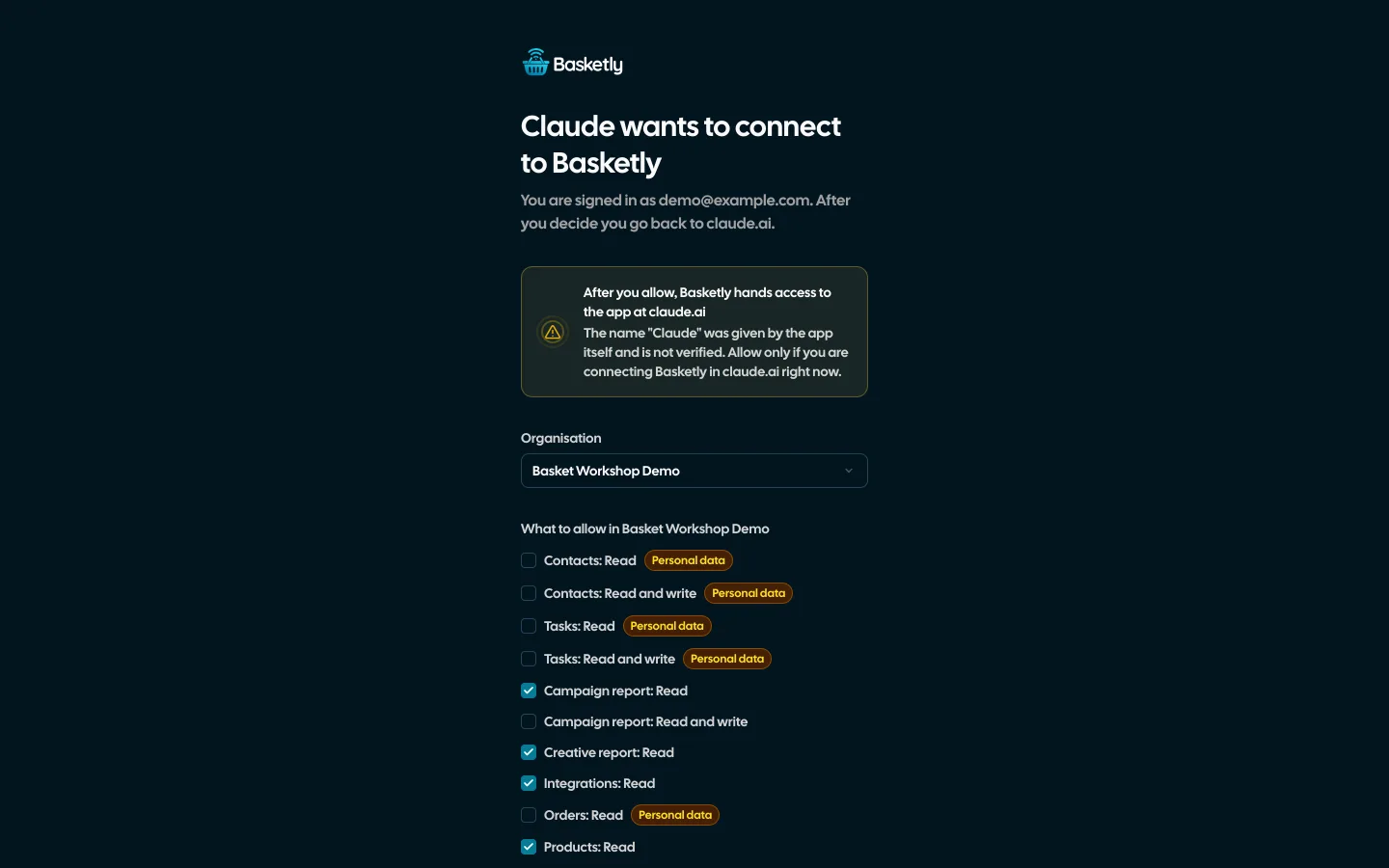
Consent in your app
When connecting you pick the organisation and the permissions. Only reading is ticked at first.
Reads a lot, writes little
Product fixes, feeds, notes and tasks when you ask. The assistant never sends conversions to Meta.
The week’s report in a minute
Revenue, orders, Meta spend and MER for the same period, compared with the one before.
Example data
Two ways to connect
MCP server address: https://app.basketly.io/mcp. In claude.ai and ChatGPT the Connect button is enough. Developer tools connect with an API key.
The Connect button
no keyclaude.ai, ChatGPT and other assistants with custom connectors.
- Add the address as a custom connector and click Connect.
- Sign in to Basketly and choose the organisation and permissions.
- The assistant acts for you, with your role.
API key
Claude Code, Cursor, n8n and your own scripts.
- On the AI agents page click "Create a key for the agent".
- Paste the ready prompt: the agent adds the MCP server and the skill itself.
- Changes are saved for the person who created the key.
What the assistant can and cannot do
The assistant’s tools are the same operations as in the app. It sees only the ones the chosen permissions allow.
| Action | Assistant |
|---|---|
| Orders, segments, integrations and the purchase balance | |
| Products with diagnosis and statistics, feeds, image templates | |
| Sales and all-channel reports, each platform’s campaigns, creatives, automations, Self-check, getting started | |
| Clients with filters, tasks, person card with history | |
| Manual product fixes, a new feed, rules and flows (when you ask) | |
| Note, status, task, a cost outside ad platforms (when you ask) | |
| Sending conversions to Meta | |
| SMS, payments, keys, team members |
Your role applies to the assistant too
Permissions from the connection are cut to your role on every request. Someone who sees only their own clients will not see anyone else’s through the assistant. Disconnect it in Account → Connected apps.
The skill: how to work with shop data
The “baskety” skill teaches the assistant what feeds, flows, product diagnosis, manual fixes and conversions mean in Basketly, which tool does what, and what not to do without asking. The kit has a Claude Code plugin, files to upload to claude.ai and AGENTS.md for other tools.
Download the skill and plugin (ZIP)Concepts
basketyFeed, flow, input and output, product score, manual fix, conversion.
Tool map
basketyWhich tool answers which question about the shop.
Rules
basketyWhat changes the ad catalogue and what cannot be undone, so it needs your consent.
An AI assistant can misread numbers. They come from the same reports as in the app, so check them there when in doubt.
Only if you give it the Clients or Orders permission and your role allows it. Permissions with personal data are marked on the consent screen. The assistant treats order details and notes as data, not instructions.
It never sends conversions. Statuses and overdue tasks can trigger configured SMS or webhooks, product and feed changes reach ad catalogues on their next download; fresh diagnostics may retry failed Meta deliveries and related API webhooks. The assistant should explain these effects before making a change.
AI agents are included in the Growth, Agency and Custom plans at no extra cost. On Free and Start you can try them for 5 days from creating your account; after that the assistant gets a plan message instead of data until you pick Growth or higher. You pay for the assistant itself with its provider, e.g. your Claude or ChatGPT plan.
In Account → Connected apps click Disconnect. It works at once. Revoke an API key on the API page.
Related features
- For agenciesA separate workspace for every client shop, roles, an all-clients overview and a job queue for each.See details
- Security and privacyEncryption, hashing, roles, retention and self-hosting.See details
- Orders and buyersEvery shop order with its lines and state, revenue, average basket, new and returning buyers, and 24 months of history.See details
- Product feedsYour shop’s feed fixed automatically and by your rules, every product diagnosed against Google Merchant Center and Meta catalogue requirements, served at its own address.See details
- Sales reportOne sentence on how the shop is doing, the six key figures and conclusions with a next step — and tabs below, each answering one question. Every number with its truth level: the shop, a platform or the last click.See details
- ConversionsShop purchases sent server-side to Meta and seven more platforms, and a day-by-day balance: how many orders, how many purchases accepted and where something got lost.See details


Get started in under 5 minutes
Connect your shop and Meta and see how many purchases really arrive.
- Free up to 100 orders a month
- No developer needed
- Purchase balance and self-check