

Shop, ads and analytics in one place
The Integrations page shows everything Basketly can connect, grouped by what it is for. Each integration’s state is counted from existing connections, and the ones not built yet are marked as planned.
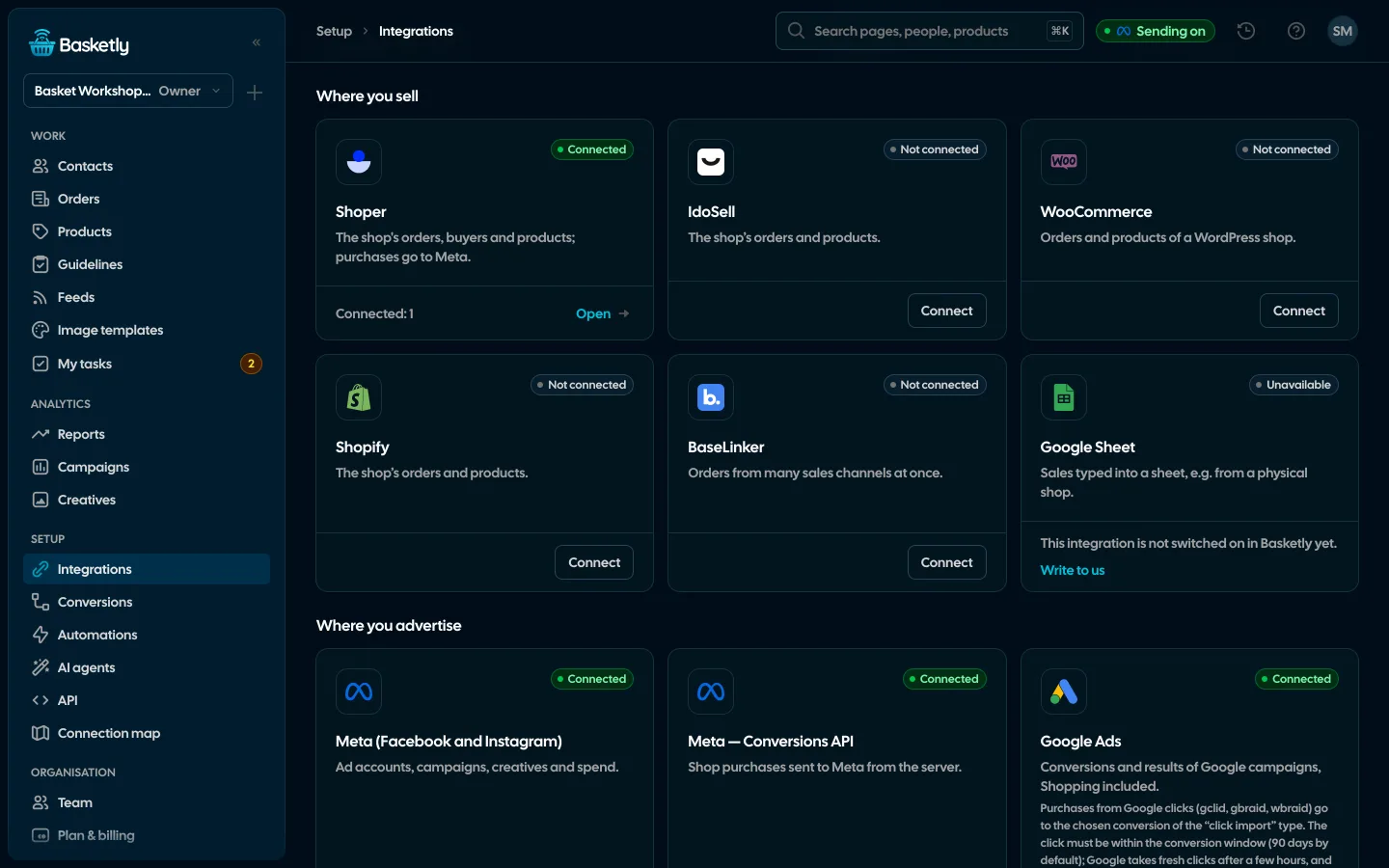
Screenshots from a demo organisation. People and numbers are fictional.
A catalogue by purpose
Each tile says what the integration gives, its state and how many connections it has, and its button opens the place where you manage it.
Where you sell
SalesShoper and Google Sheets. Planned: IdoSell, WooCommerce, Shopify, BaseLinker.
Where you advertise
AdsMeta, Meta Conversions API, Google Ads and Microsoft Ads (sign-in, purchases from clicks, spend), TikTok, Pinterest.
Where the catalogue goes
CatalogueGoogle Merchant Center, the Meta catalogue and comparison sites, through feed addresses.
Analytics and consent
AnalyticsGoogle Analytics 4, a Google account and the shop script.
Marketing
MarketingKlaviyo, smsportal.app (texts from your own phone, connected with one click) and other SMS gateways.
For developers
DevAPI, webhooks and AI agents.
Shoper without a developer
You enter the login and password of the shop’s API user, choose the statuses that count as paid (e.g. cash on delivery) and the field that is the catalogue id. Basketly creates its webhook in the shop and reads orders 7 days back and every product.
See orders and buyers- Orders from the webhook and every 15 minutes, because Shoper sends each webhook only once
- Products with their feed diagnosis on connect, nightly and after shop changes
- “Sync now” reads orders and products at once
- Disconnecting removes the webhook from the shop and forgets the login
Key-based connections
GA4, TikTok, Pinterest and Klaviyo connect with a key: up to 5 accounts of each. The key is stored encrypted and never shown again, and each connection has a state and the time of its last check.
See every channel| Integration | What you enter | How we check |
|---|---|---|
| Google Analytics 4 | Measurement ID G-… and a Measurement Protocol secret | Google cannot confirm the secret up front: “saved, not checked” |
| TikTok Events API | Ad account, pixel code, access token | The account’s pixel list |
| Pinterest Conversions API | Ad account, access token | Reading the ad account |
| Klaviyo | Private API key | Reading the account |
The shop script, only with consent
The script does nothing until the consent banner reports the shopper’s consent. Then it keeps an attribution id for up to 30 days, uses the existing _fbp and takes fbc only from a real ad click. It also counts product views and carts for product statistics. Withdrawing consent clears its data.
- Works without the Meta Pixel
- The script’s public key can never confirm a purchase; only the server can
- HTTPS only, and only from the shop’s address
Sources, receivers and accounts
The other tabs are Sources (Shoper, IdoSell, BaseLinker, Google Sheets), Receivers (Meta datasets that get purchases) and Connected accounts (Google and Meta logins, SMS accounts). Several Google and Meta logins per organisation; disconnecting one pauses what depends on it, and reconnecting resumes exactly that.
Integrations marked as planned do not work yet. Purchases go to Meta, GA4, TikTok, Pinterest, ChatGPT Ads, Klaviyo, Google Ads and Microsoft Ads today; segments go to Meta and to Klaviyo lists. Campaign results are read from Meta, Google Ads and Microsoft Ads, and from TikTok, Pinterest and Klaviyo once reading is switched on.
Yes. Each Shoper source is its own connection with its own orders and products. For separate businesses, separate organisations are more convenient.
For sales that do not go through the shop: a row with a status in the sheet becomes an event for Meta. The sheet is read about every minute, and we see only the files you pick.
Yes. Orders are also accepted at a trusted server address with the source’s private token, and people and events through the public API (from the Growth plan).
Related features
- ConversionsShop purchases sent server-side to Meta and seven more platforms, and a day-by-day balance: how many orders, how many purchases accepted and where something got lost.See details
- Meta Conversions APIPaid shop orders sent to Meta from the server: a durable queue, deduplication, SHA-256 hashing and a result for every delivery.See details
- Self-checkOne check of your whole setup: the shop, purchases sent to Meta, logins, background jobs and automations, with a link to the fix for every problem.See details
- Orders and buyersEvery shop order with its lines and state, revenue, average basket, new and returning buyers, and 24 months of history.See details
- Product feedsYour shop’s feed fixed automatically and by your rules, every product diagnosed against Google Merchant Center and Meta catalogue requirements, served at its own address.See details
- Sales reportOne sentence on how the shop is doing, the six key figures and conclusions with a next step — and tabs below, each answering one question. Every number with its truth level: the shop, a platform or the last click.See details


Get started in under 5 minutes
Connect your shop and Meta and see how many purchases really arrive.
- Free up to 100 orders a month
- No developer needed
- Purchase balance and self-check