

Every ad channel against what the shop really sold
Each platform claims purchases within its own attribution window, so their numbers together always exceed the shop’s orders. Basketly shows every channel on one page and keeps apart what the platform says, what Basketly read from the last click and what the shop sees.
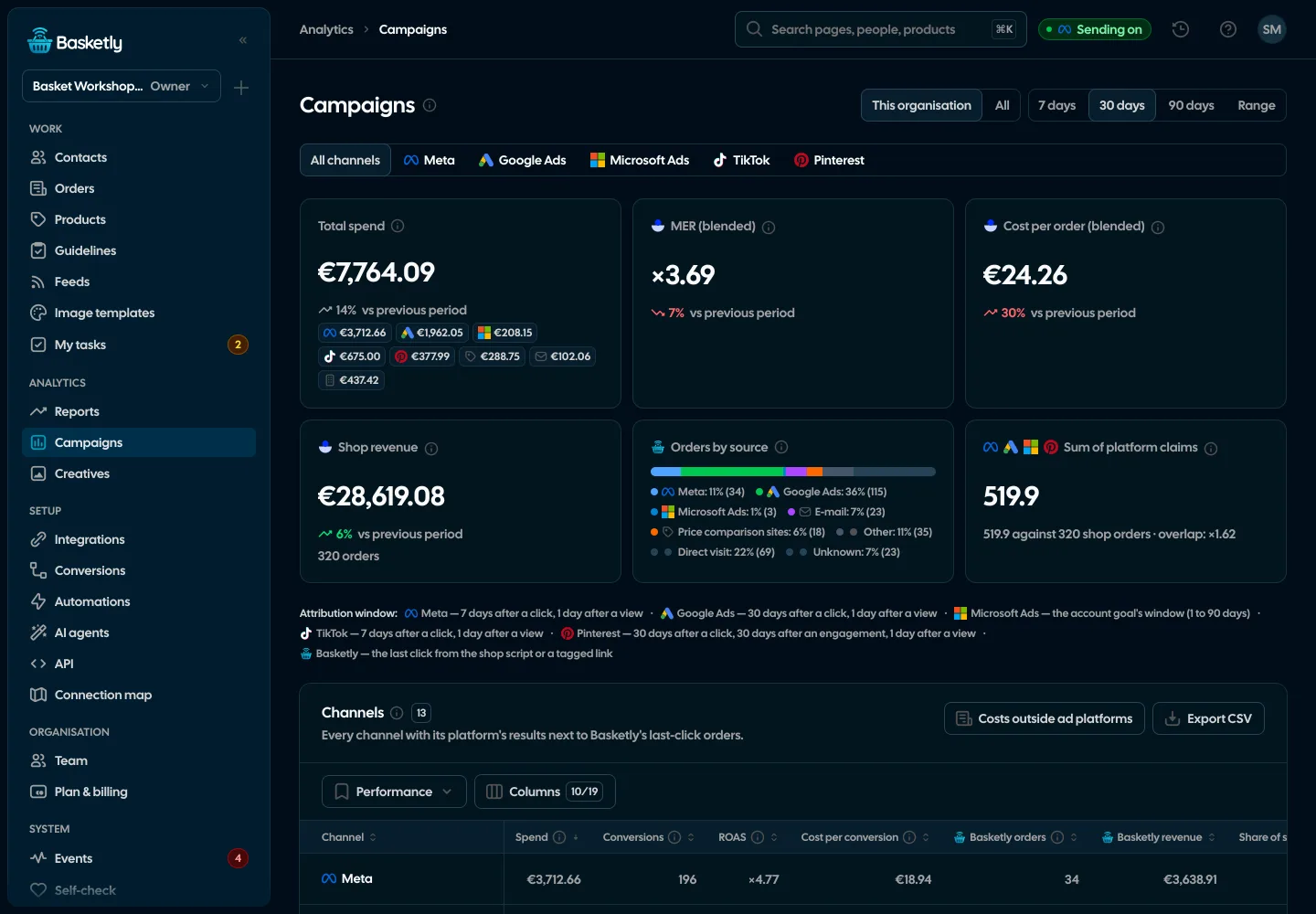
Screenshots from a demo organisation. People and numbers are fictional.
Every channel on one page
Campaigns → All channels and the top tiles of Reports count the shop against all spend. Each tile is compared with the previous period of the same length and has an (i) with its definition and source.
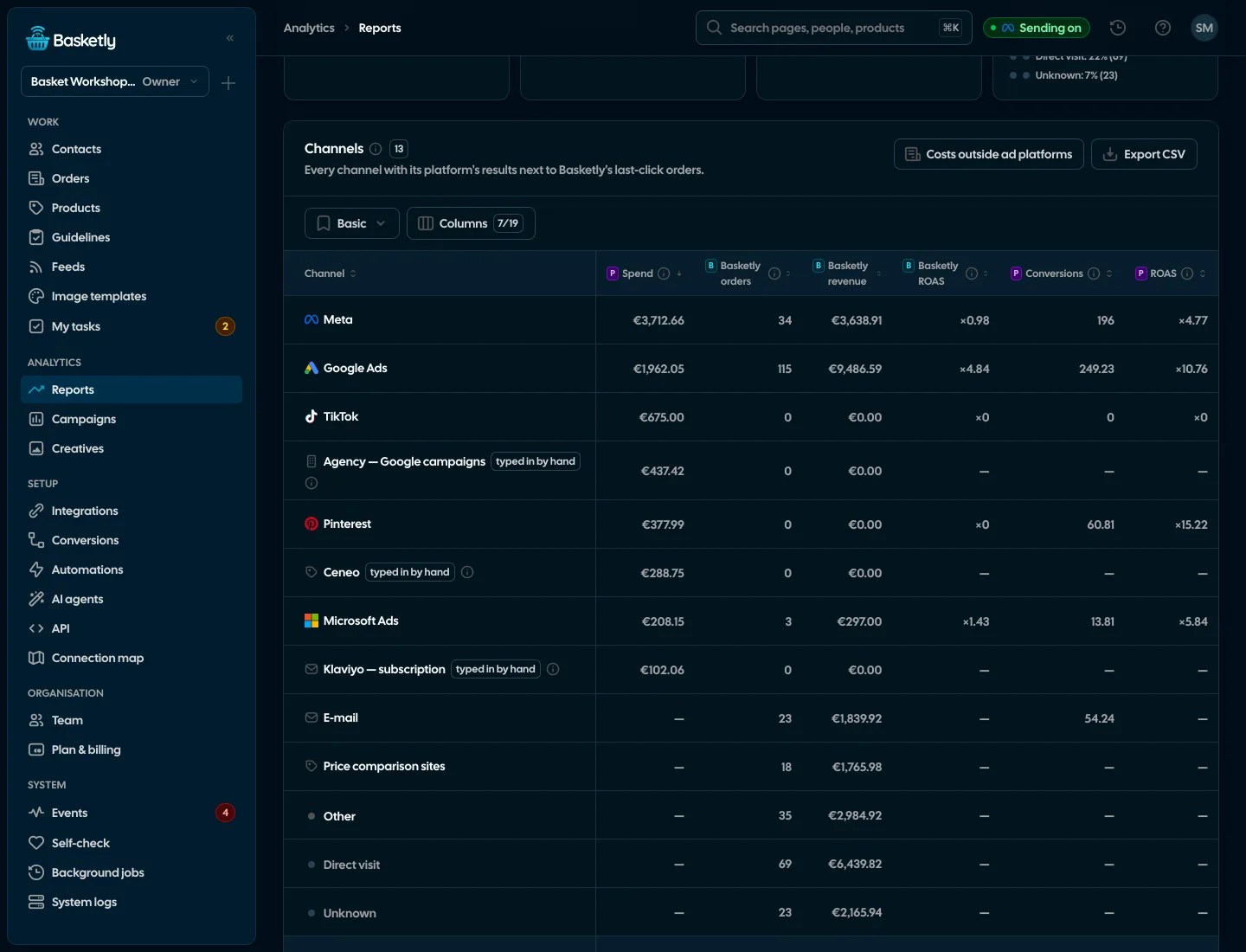
Three truth levels, never mixed
Every number in the Channels table belongs to one of three levels and says so in its header.
Platform
Meta, Google, TikTok…What the platform itself reports, within its attribution window named on the row.
- Conversions, their value, ROAS and cost per conversion
- Never added across platforms: the totals row leaves them empty
Basketly (last click)
Shop scriptOrders whose last ad click Basketly read from the shop script (after consent) or a tagged feed link.
- The channel’s orders and revenue, Basketly ROAS and cost per order
- Share of all the shop’s orders
Shop
OrdersPaid, not cancelled shop orders, wherever they came from.
- Channel MER: shop revenue per unit of spend in the channel
- Labelled co-occurrence, not attribution
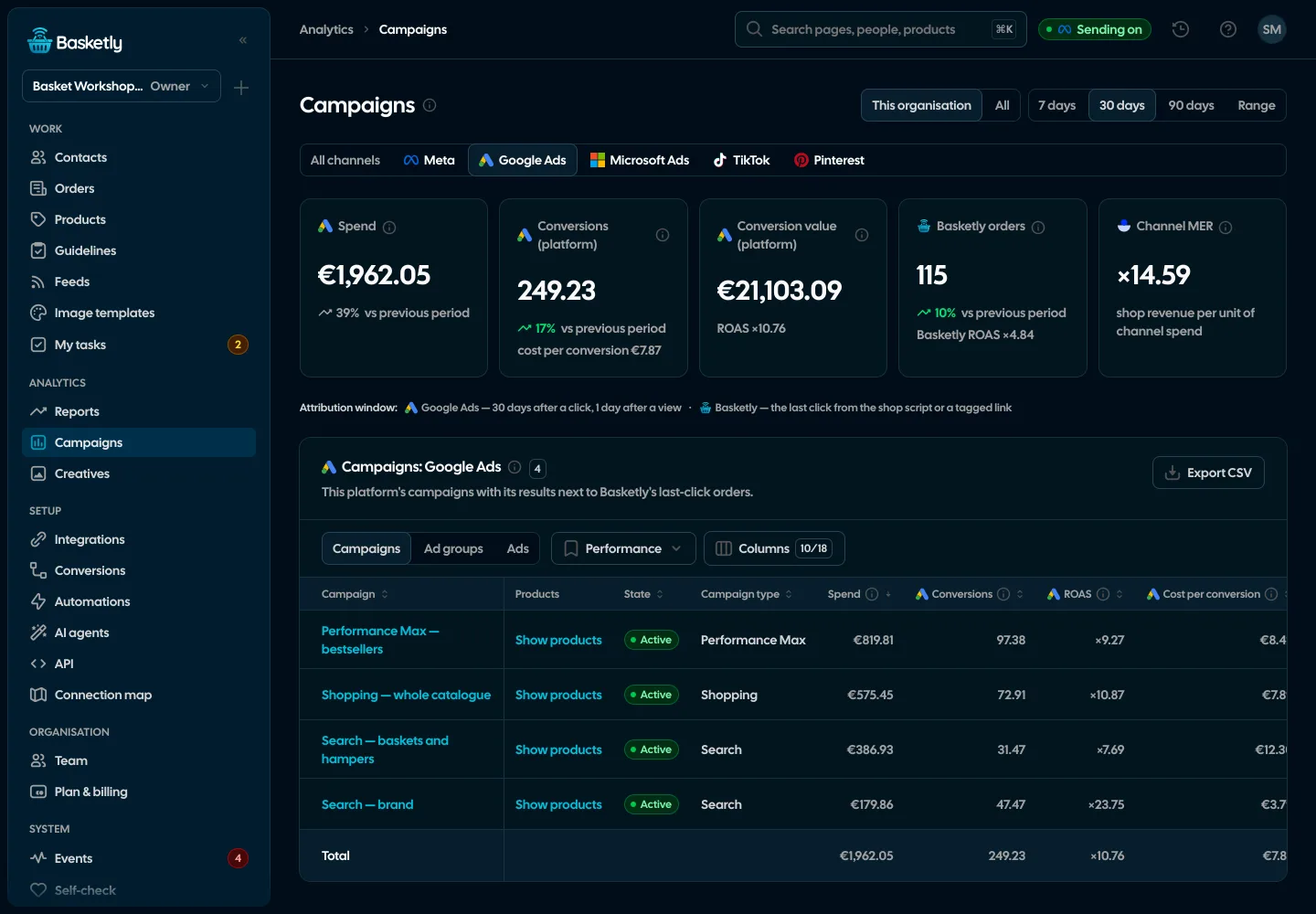
Each channel on its own campaigns
Tabs with the platform’s logo: Meta always, and Google Ads, Microsoft Ads, TikTok, Pinterest and ChatGPT Ads when they have spend in the period or are connected. A channel tab has that platform’s tiles (spend, conversions with cost, value with ROAS, Basketly orders, channel MER) and a table of its campaigns.
- Campaign state (active, paused, removed) and type: Search, Shopping, Performance Max, Display, Video, Demand Gen, App
- Ad groups and ads as further levels where the platform gives them (TikTok, Pinterest and ChatGPT Ads: campaign → ad group → ad)
- Basketly orders of a campaign matched by campaign id or by a utm_campaign equal to its name
- “Show products” on Google Ads and Microsoft Ads campaigns: products with the platform’s own conversions next to the shop’s sales
- Performance, Shop sales and Engagement views, a totals row in one currency and CSV export
Attribution windows printed on every channel
Where a platform exposes its attribution window, we read it and print it in days. That shows why two platforms claimed the same order.
| Channel | Attribution window |
|---|---|
| Meta | The most common window of the active ad sets (the account’s default) |
| Google Ads | The purchase conversion action’s window, 30 days after a click by default |
| Microsoft Ads | The account’s conversion goal window |
| TikTok | The most common ad group window, marked when ad groups differ |
| 30 days after a click, 30 after engagement, 1 after a view | |
| Basketly | Last click from the shop script or a tagged link |
Costs outside ad platforms and your real MER
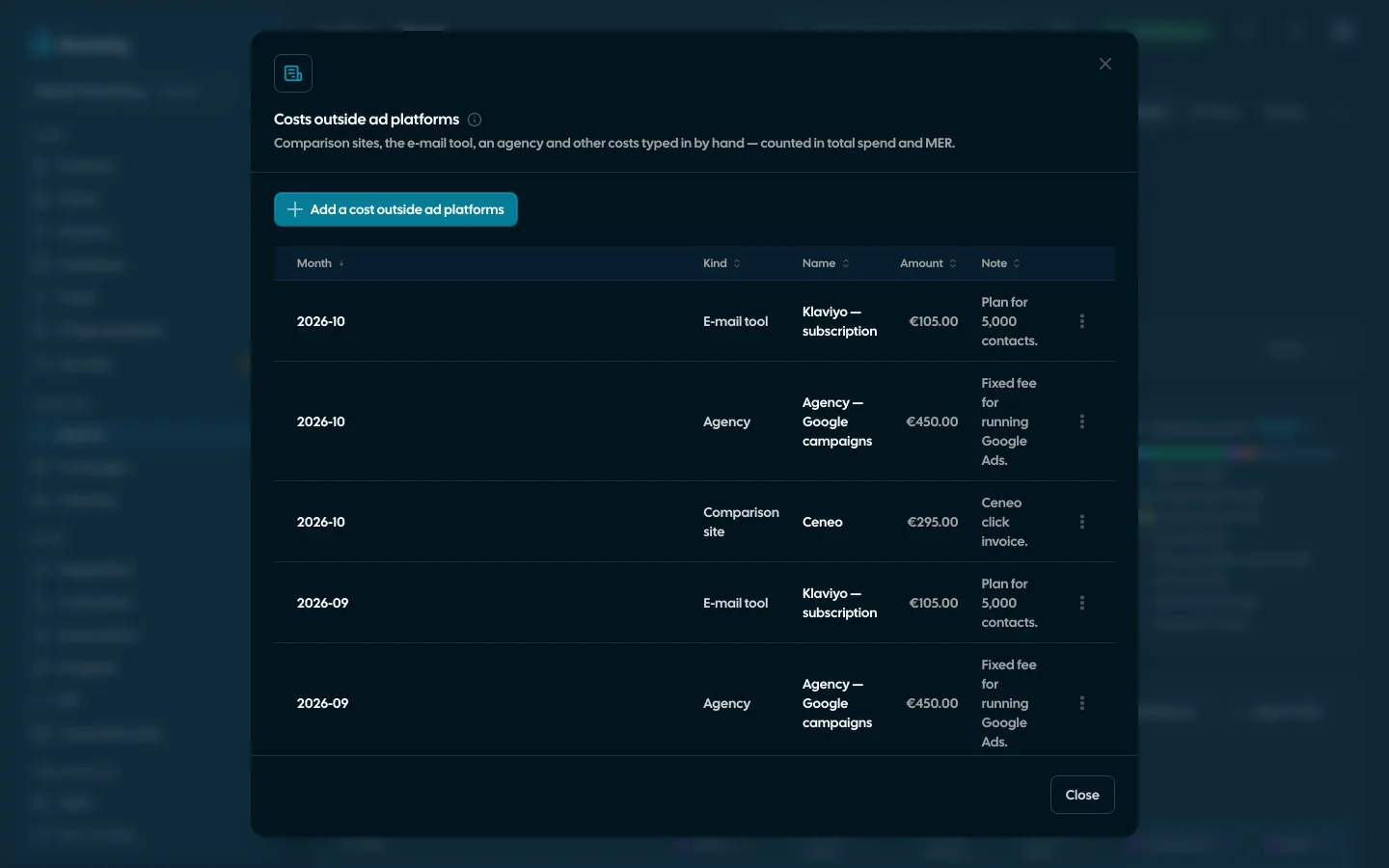
Comparison sites, the e-mail tool or an agency cost money no ad platform reports. In “Costs outside ad platforms” you type in a monthly amount. We spread it evenly over its days and count it in total spend, MER and cost per order — as its own row marked “typed in by hand”, never in platform figures.
- Kind: comparison site, e-mail tool, agency or other (then with a name), month, amount, currency and a note
- Viewing with Reports view, changes with Reports edit; every change is audited
- Optional: spend in foreign currencies converted by the NBP average rate of the spend day (table A), with the rate’s date under the table. Off by default — other currencies are then counted apart
Where every order came from
The Source column in Orders shows the channel of the last click according to Basketly: Meta, Google Ads, Microsoft Ads, TikTok, Pinterest, ChatGPT Ads, e-mail (utm_medium email or newsletter, sources such as Klaviyo, Mailchimp, GetResponse, FreshMail, Brevo), price comparison sites (Ceneo, Skąpiec, Nokaut, Okazje, Idealo), other, direct visit or unknown. The “Orders by source” bar and each channel’s Basketly orders are counted from these sources.
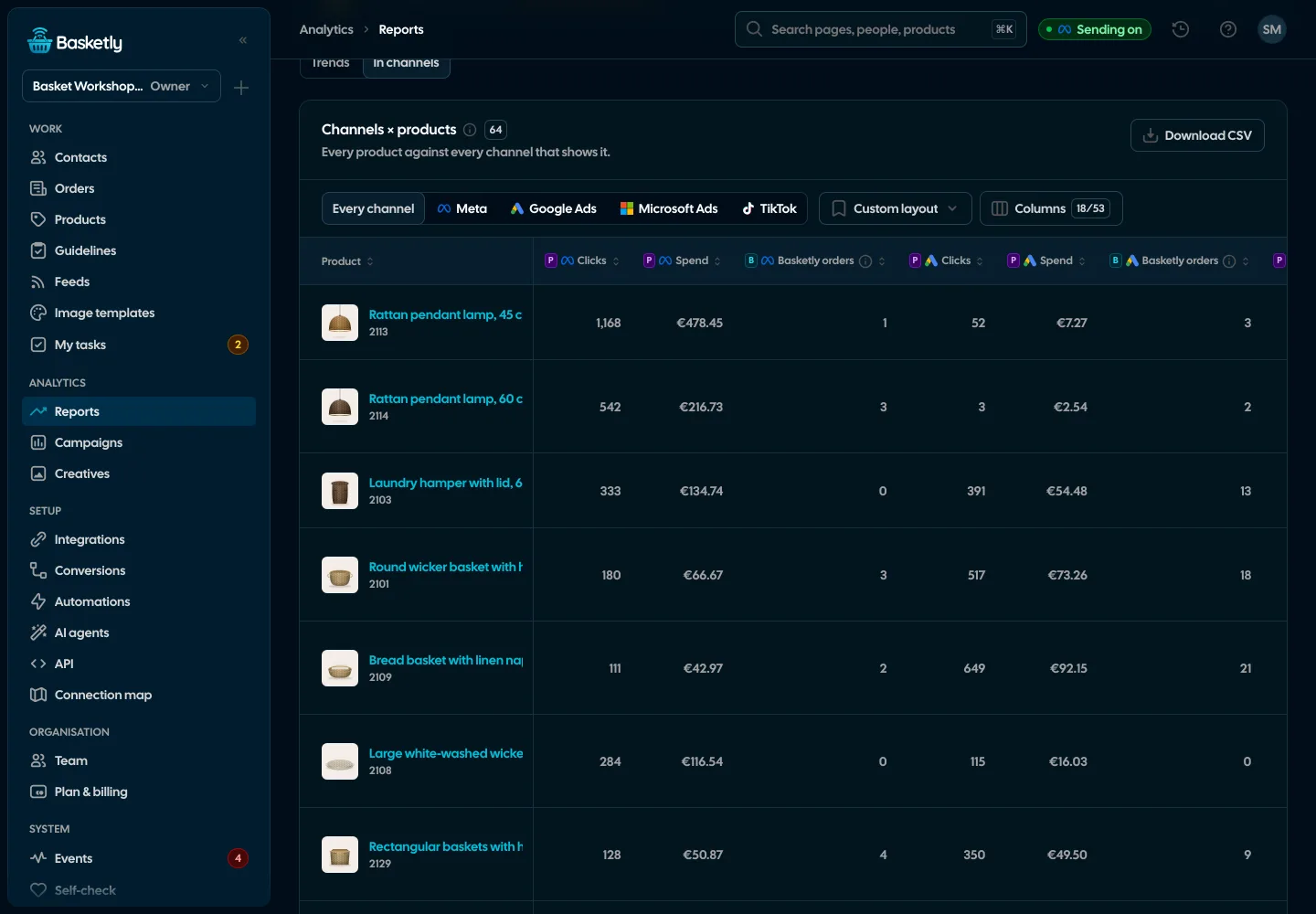
See orders and buyersProducts in channels
A view of the Reports Products tab (In channels) where every product stands against every channel that shows it: impressions, clicks, spend, CTR, the platform’s own conversions where it reports them per product (Meta does not), Basketly orders of the channel and units per 100 clicks. Next to it a Shop group (units, revenue, stock, days of cover) and a channel comparison with the product’s best channel.
- A channel without per-product data in the period gets no zeros; the table’s (i) names it
- Google Ads, Microsoft Ads and TikTok appear by themselves once their per-product reads store rows
- Never a column adding up platform conversions
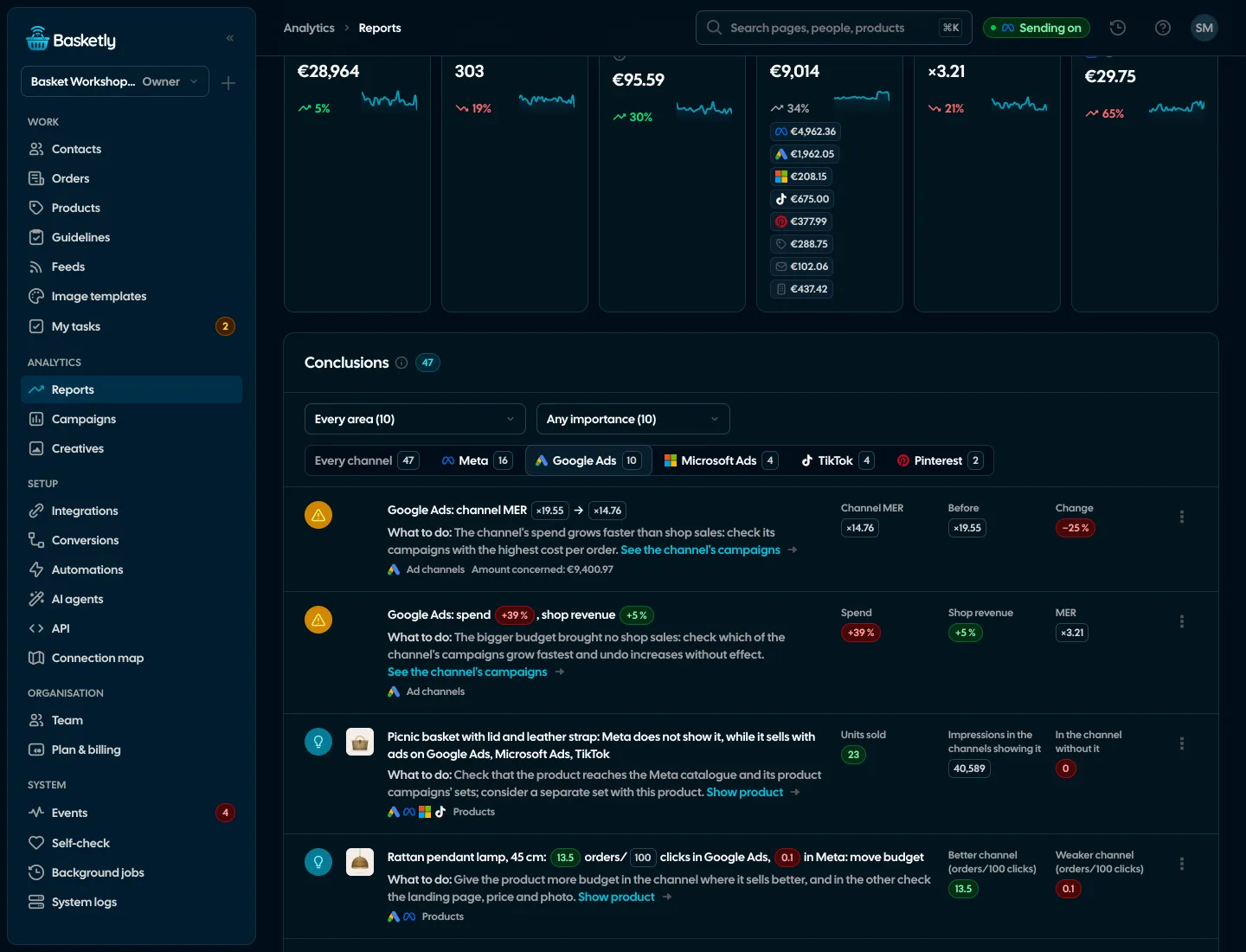
Conclusions about channels
The Conclusions list in Reports has a Channels area and a channel filter with logos. Each rule speaks only from its minimum sample and names the truth level of every number.
TikTok, Pinterest and Klaviyo: reading results
TikTok, Pinterest and ChatGPT Ads connections send purchases, and with the “Read campaign results” switch on in Integrations they also read results: 90 days at once, then every 6 hours, at the campaign, ad group and ad level. A token without reporting permission gets a readable reason on the channel tab and in Self-check — never invented figures. Klaviyo with the same switch adds its e-mail campaign and flow revenue to the E-mail row of the Channels table.
See integrations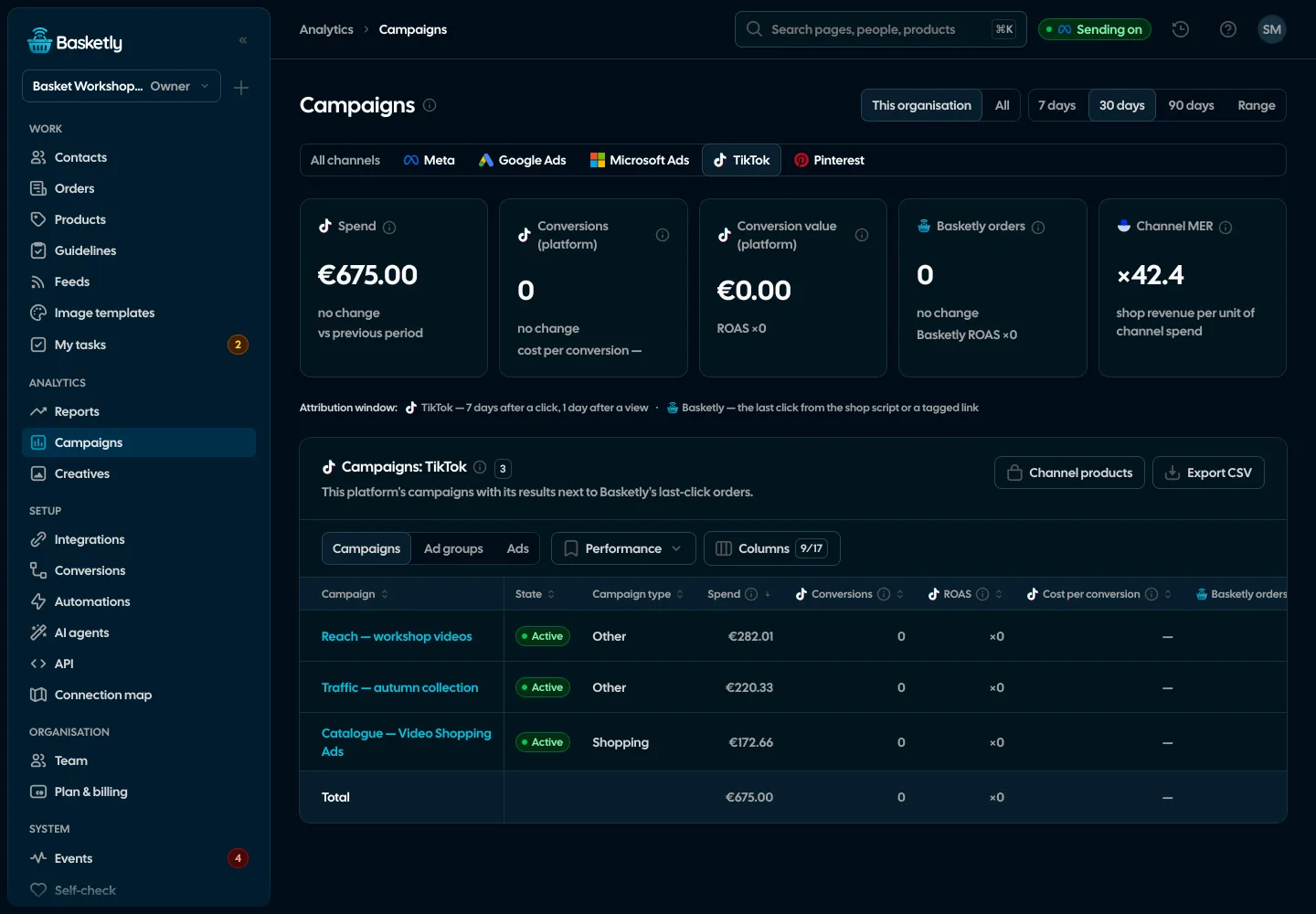
Creatives and the weekly report know about channels too
Creatives have the same channel tabs: TikTok ads with video covers, Google ads with their assets (headlines, descriptions, images, YouTube videos) and Microsoft ads, with the platform’s figures and Basketly orders. The Monday e-mail gives each channel’s spend with its change and the blended MER.
See creative analytics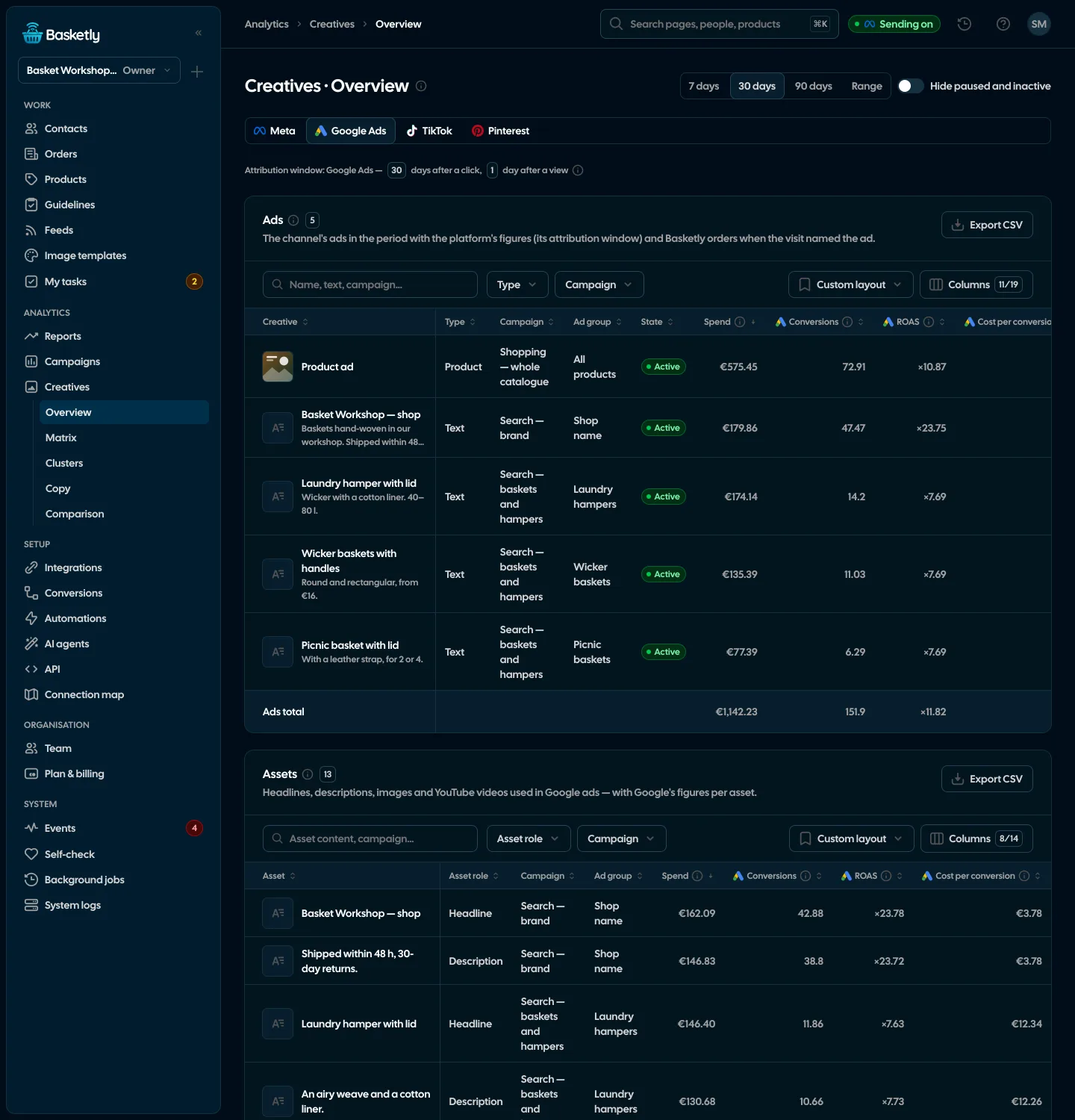
Platform conversions come from their reports, each within its own attribution window, and we never add them across platforms. Basketly orders are our reading of the last click, and MER is shop revenue divided by spend, without attributing sales to ads. None of these numbers proves that a campaign optimises on the data sent.
Each platform claims a purchase if the buyer saw or clicked its ad within its attribution window. One order can be claimed by Meta and Google at once. That is why we show the sum of claims only next to the shop’s orders, with the overlap ratio, and never add it to sales.
Meta spend is read for the ad accounts of your Meta receivers. Google Ads and Microsoft Ads are connected by signing in under Integrations, and TikTok, Pinterest and ChatGPT Ads by the “Read campaign results” switch on their connection. Basketly orders per channel need the shop script after the buyer’s consent, or tagged feed links.
Not by default: spend in a currency other than the shop’s main one is counted apart and named in the (i). An owner or admin can switch on conversion by the NBP average rate of the spend day; the Channels table then shows the rate’s date and every converted amount.
No. We only read those platforms’ campaign results. Costs outside ad platforms typed in by hand stay in the panel and are not sent anywhere.
Yes. The channel report, each platform’s campaigns, products × channels, conclusions with a channel filter and costs outside ad platforms are in API v1 and the MCP tools. Reading TikTok, Pinterest and ChatGPT Ads results is switched on in the panel only.
Related features
- Sales reportOne sentence on how the shop is doing, the six key figures and conclusions with a next step — and tabs below, each answering one question. Every number with its truth level: the shop, a platform or the last click.See details
- Campaign reportingCampaigns of Meta, Google Ads, Microsoft Ads, TikTok, Pinterest and ChatGPT Ads, each platform on its own figures and attribution window, next to the shop’s orders and revenue, with products in catalogue ads.See details
- Creative analyticsCost per purchase and ROAS from Meta’s report, hook rate and a fatigue signal for every creative.See details
- Orders and buyersEvery shop order with its lines and state, revenue, average basket, new and returning buyers, and 24 months of history.See details
- Product feedsYour shop’s feed fixed automatically and by your rules, every product diagnosed against Google Merchant Center and Meta catalogue requirements, served at its own address.See details
- ConversionsShop purchases sent server-side to Meta and seven more platforms, and a day-by-day balance: how many orders, how many purchases accepted and where something got lost.See details


Get started in under 5 minutes
Connect your shop and Meta and see how many purchases really arrive.
- Free up to 100 orders a month
- No developer needed
- Purchase balance and self-check