

Know what broke before your client notices
Purchases stop reaching Meta without a message: a login expires, the shop stops sending orders, Meta starts rejecting events. Self-check looks at your whole setup in one place and shows what to click for every problem.
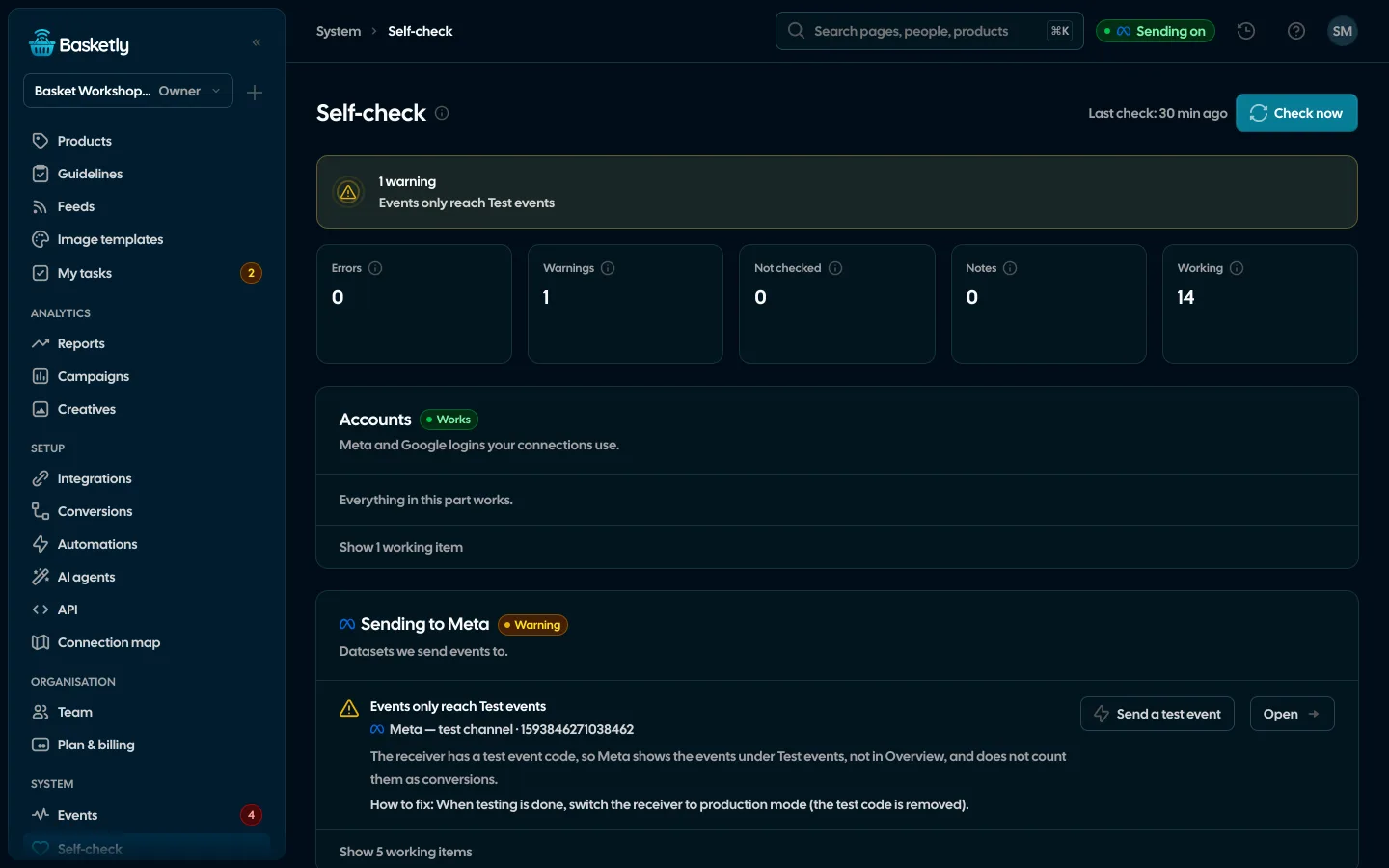
Screenshots from a demo organisation. People and numbers are fictional.
The result, the fix and what repaired itself
One check ends with a summary, a card for every area and a list of the repairs we made without you.
Your whole setup in one result
At the top, the number of errors, warnings, things not checked, notes and working items. The error count also sits next to Self-check in the menu.
At every problem: what to click
Every warning and error has a description, a fix and an “Open” button that takes you to the place in the app where you make it.
Some things repair themselves
When the cause has passed, the check sends rejected events again and retries failed jobs, each only once, and records it as “Repaired automatically”.
Example data
Seven areas in one check
Each area has its own card with a result and a list of checks. Errors come first, and their count sits next to Self-check in the menu.
Accounts
Meta and Google logins behind receivers and sheets: disconnected while still in use, needing a reconnect, Meta access expired or expiring within 7 days.
Sending to Meta
Sending off or paused, dataset access, test mode, a missing token, rejected and waiting events, Meta’s own statistics next to our sends.
Conversions
A non-Meta source without a flow and a flow to a paused receiver.
Other sources
Google Sheet read errors or no read for over an hour, a shop or server with no conversion at all or no new one for 7 days, an IdoSell or BaseLinker shop not connected to its API or whose last read failed.
Background jobs
Failed jobs from the last 24 hours that nobody resolved, and jobs running for over an hour.
Automations
Live automations with failed steps in 7 days, SMS accounts in error, automation sending switched off on the server.
Campaigns
How fresh each ad account’s spend is (older than 26 hours is a warning) and creatives waiting to be read.
Five results, each with a fix
A result is more than a red badge. Each check has a description, a fix and a link to the place in the app where you make it, and for a dataset also a link to Events Manager. The last 20 checks stay in the history.
| Result | What it means | What you do |
|---|---|---|
| Error | Something does not work now, such as Meta rejecting events or an expired login | Click the link by the result and fix the place it shows |
| Warning | It works, but something is breaking or about to, such as a login expiring within 7 days | Fix it before it becomes an error |
| Not checked | Meta did not answer (rate limit, network), so we do not know whether there is a problem | Check again in a moment; it is never a false error |
| Note | Something worth knowing, including a repair made automatically | Nothing, unless you want to look |
| Works | The check passed | Nothing |
Some things repair themselves
When the cause has passed, Self-check does not wait for you. It records every repair in the result as “Repaired automatically”. What needs a person, such as a new login or an access in Meta, it only reports.
Rejected events
onceSent again when Meta or the network failed, or when the receiver has a token again. Events Meta refused for their data are not sent again.
Failed job
onceRuns a background job again when it failed for the first time in a day. A lost Meta login is not retried.
When it checks
It does not run on a timer or when you open the page, so it never spends your Meta limits for nothing. You can also start it with “Check now”, up to 6 times an hour.
- 1
A setup change
A source, receiver or flow added or removed, an account reconnected, the first read of an ad account.
- 2
Two quiet minutes
The check waits 2 minutes after the last change, so it does not start on every click.
- 3
One background job
One job, shown in Background jobs, checks every area; it first makes the repairs it can make itself.
- 4
Result and count
Every role with access sees the result; the number of errors appears next to Self-check in the menu.
Match events
A tool next to Self-check. It compares the receiver’s dataset over the last 28 days, our accepted sends and the ad sets optimising on it, and tells you when something does not fit, e.g. an ad set optimising for an event nobody sends.
See Meta Conversions API- Names Meta accepted but never recorded
- Other server senders in the same dataset
- Proposed names taken from the ones the dataset already knows
A green result means the Basketly side of your setup and its access to Meta work. It does not prove that a campaign optimises on your events or how Meta attributes conversions. Check that in Events Manager and Ads Manager.
Open Self-check and click “Check now”. Common causes are an expired Meta login, sending switched off or paused on a receiver, and a shop source with no new orders for 7 days. Each comes with a link to the place where you fix it.
No. It runs after a setup change and on “Check now”. A silent failure on Meta’s side shows up in the next check, so click it whenever the numbers look off.
Meta did not answer the request, for example because of a rate limit or the network. We do not know whether there is a problem, so we do not show an error. Check again in a moment.
No. It reads data from Meta and changes nothing there. It only repairs things on the Basketly side, such as resending rejected events or retrying a failed job, and records that in the result.
Every role with access to Self-check. The Viewer role sees login names masked. Owners, admins and operators can click “Check now”.
Related features
- ConversionsShop purchases sent server-side to Meta and seven more platforms, and a day-by-day balance: how many orders, how many purchases accepted and where something got lost.See details
- Meta Conversions APIPaid shop orders sent to Meta from the server: a durable queue, deduplication, SHA-256 hashing and a result for every delivery.See details
- IntegrationsShop, ads, product catalogues, analytics and marketing in one catalogue, each integration’s state counted from what is actually connected.See details
- Orders and buyersEvery shop order with its lines and state, revenue, average basket, new and returning buyers, and 24 months of history.See details
- Product feedsYour shop’s feed fixed automatically and by your rules, every product diagnosed against Google Merchant Center and Meta catalogue requirements, served at its own address.See details
- Sales reportOne sentence on how the shop is doing, the six key figures and conclusions with a next step — and tabs below, each answering one question. Every number with its truth level: the shop, a platform or the last click.See details


Get started in under 5 minutes
Connect your shop and Meta and see how many purchases really arrive.
- Free up to 100 orders a month
- No developer needed
- Purchase balance and self-check