Meta Ads Reporting for Agencies: Many Clients, Clear Roles and One View of Results
How an agency can report on Meta campaigns for many client shops: partner access in Meta, one workspace per client, team roles and an all-clients overview.
On this page
- How should agency access to client assets be set up in Meta?
- One organisation per client
- Roles: who at the agency and the client sees what
- What is in a single client's report?
- The all-clients overview
- A 20-minute weekly agency routine
- What to tell clients so the report stays honest
- What does it cost an agency?
- Limits worth knowing
An agency running campaigns for a dozen shops has two problems at once: access to each client's Meta assets, and reports that put ad spend next to the shop's real sales. Ads Manager shows the purchases it credited to ads, but it does not know how much the shop actually sold. This guide covers how to set up access on the Meta side, how to keep clients apart in your tool, and what a weekly results review looks like in practice.
How should agency access to client assets be set up in Meta?
The rule is simple: the client owns the assets, the agency gets access as a partner. The ad account, dataset (formerly the Pixel) and product catalogue stay in the client's business portfolio. When the engagement ends, the client removes access and nothing has to be migrated.
Meta describes the process in Give a partner access to business assets. In short:
- The agency has its own business portfolio and sends the client its ID.
- Someone with full control of the client's portfolio opens Settings → Users → Partners and chooses to give a partner access to assets.
- The client enters the agency's portfolio ID, selects the assets and the access level.
- Both portfolios then show the shared assets in their settings.
Two things that are easy to miss:
- A partner cannot reshare an asset, even with full control. Only the owner can. With partial access, the agency can only give its people the tasks it received.
- The shop is separate access. Meta permissions give no access to orders. The shop connection (an API key or API user) is set up by the client or handed to the agency, and Basketly stores it encrypted and never shows it again.
One organisation per client
In Basketly, each agency client is a separate organisation. A single user account can belong to any number of organisations and switch between them. Every record, from an order to a Meta connection, belongs to exactly one organisation, and the server checks the user's membership on every request rather than trusting what the request says. Client A's data cannot leak into client B's report through a filter mistake.
Meta connections live inside an organisation too. When adding a source you pick a specific connected Meta account and a specific ad account; there is no "all accounts at once" option. That is deliberate: with a dozen clients it is easy to attach the wrong business's account, so every choice is explicit. Spend is fetched for the ad accounts the organisation already uses in its data destinations, with no extra setup.
Each organisation also has its own background job queue (shop orders and products, feeds, spend, ad set settings). A large read for one client does not block the others: organisations take turns, and every job's state is visible on the Background jobs page.
Roles: who at the agency and the client sees what
| Role | Typical person at the agency or client | What they can do |
|---|---|---|
| Owner | Typical person at the agency or clientagency owner | What they can doeverything, including invitations, roles and data retention |
| Admin | Typical person at the agency or clientcampaign specialist | What they can doMeta connections, flows, automations, invitations and roles |
| Operator | Typical person at the agency or clientthe client's shop staff | What they can doadd and edit people, notes, statuses, tasks, retry failed deliveries |
| Viewer | Typical person at the agency or clientanyone on the client side who only reviews results | What they can doread-only; the full campaign and sales reports, masked phone and email in Clients, no SMS text |
The Viewer role is a good way to let a client check their own campaign results. Campaign names and numbers are not personal data, so they see them in full, while buyers' contact details stay masked.
An invitation is a one-time link valid for 72 hours and tied to a specific email address. The app emails the invitation to that address and also shows the link in the panel, so you can pass it on through your own channel. Admins can change roles and remove access, but cannot change the owner's access or their own.
What is in a single client's report?
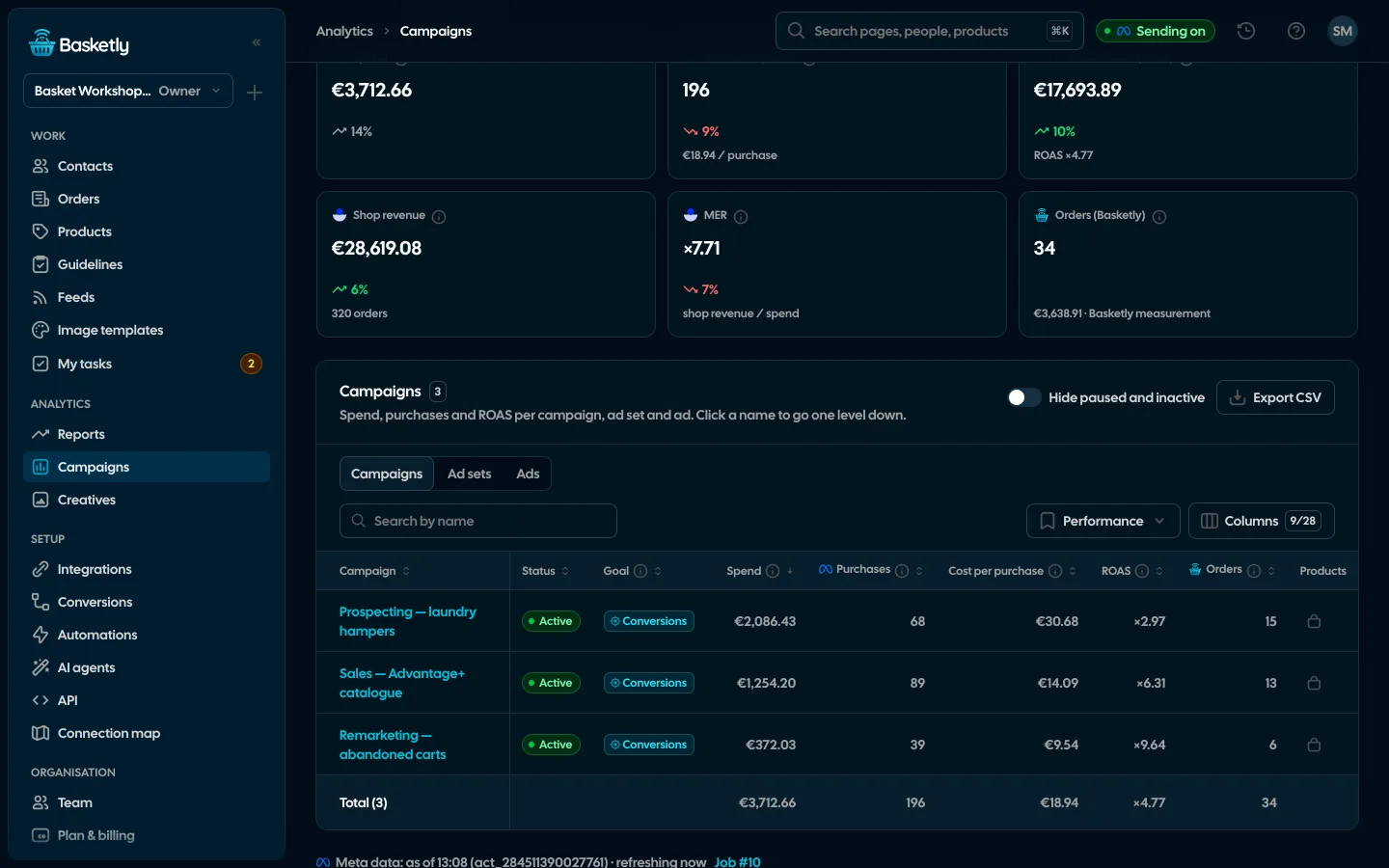
The campaign reporting page joins Meta spend with the purchases Meta credited to ads and with the shop's sales. For each campaign, ad set and ad you see:
- spend, purchases as Meta reports them, purchase value, cost per purchase and ROAS,
- the catalogue products that a campaign or ad showed, with their sales in the shop,
- tiles with change versus the previous period, drill-down (campaign → ad set → ad) and CSV export.
For the whole account the tiles also show shop revenue from bought, not cancelled orders placed in the period, and MER: shop revenue divided by spend. The sales report page puts the same figures week against week and can email a summary every Monday.
This is the Meta tab. If the client also advertises on Google Ads, Microsoft Ads, TikTok or Pinterest, Campaigns has a tab for each of those channels with its campaigns and figures as its platform reports them, and the All channels tab shows total spend, MER (blended), cost per order and the Channels table, where conversions of different platforms are never added up. Costs outside ad platforms, such as comparison sites or the agency fee, can be typed in by hand so the client's MER is real.
A few counting rules to understand before you show a client the report:
- Purchases and ROAS come from Meta's report, meaning its attribution. The shop usually has more orders, because it also counts organic sales.
- Shop revenue and MER are counted for the whole account only. One campaign's share of the shop's sales can't be stated honestly.
- Spend days use the ad account's time zone, and orders the organisation's.
- Currencies are not converted. Every ad-account currency gets its own tiles.
How cost per purchase, ROAS and MER differ, and which number to trust, is covered in ROAS, MER and cost per purchase.
The all-clients overview
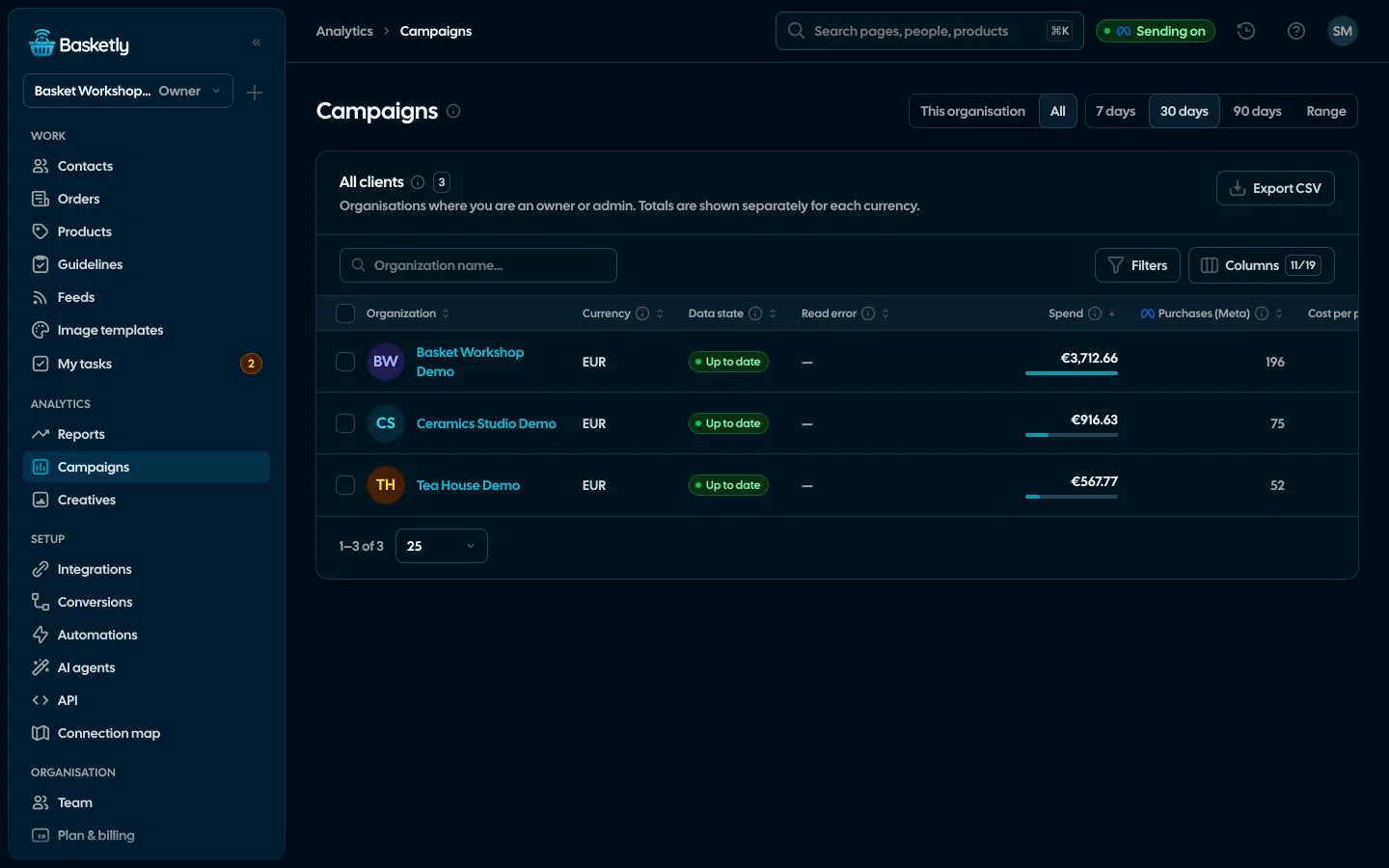
Anyone who is owner or admin in at least two organisations sees an All switch on the campaign page. It shows one row per organisation, with spend and results for the chosen period and totals per currency, and flags organisations whose data is stale (for example when Meta access has expired). Operators and viewers do not get this view, so a client never sees the agency's other clients.
A 20-minute weekly agency routine
- Open the All view and compare spend and results across clients. Those with the highest cost, or a clear increase since your last review, go to the top of your list.
- Check stale-data flags. Meta tokens do not refresh themselves; after expiry the data stays, the page shows when it was last updated and links to reconnect.
- Check the purchase balance on the Conversions page: whether shop orders reach Meta and which errors repeat most often. How to read it is covered in the purchase balance.
- Review Background jobs for clients with errors: Meta rate limits, expired access, a feed that failed to download.
- Export CSV for clients who want their report in a spreadsheet.
What to tell clients so the report stays honest
The report combines data from two worlds, so it is easy to over-claim. Three sentences worth repeating:
- ROAS from Meta's report and MER from the shop are two different numbers. ROAS says what Meta credited to ads; MER, how much the shop sold per unit of spend. Neither proves that a given order came from an ad.
- Sending events to the Conversions API gives Meta the data it needs to optimise, but does not guarantee a lower cost. Meeting Meta's conditions is not proof of optimisation either; Ads Manager shows that.
- A recent period is incomplete. Some of the last few days' orders are still waiting for a transfer or a cash-on-delivery collection.
What does it cost an agency?
The Agency plan is $229 a month. Only the total number of orders across all clients counts, not workspaces or seats:
| What it includes | Agency plan |
|---|---|
| Orders per month | Agency plan25,000 in a shared pool |
| Organisations (clients), users, Meta ad accounts | Agency planunlimited |
| Features, including the all-clients overview | Agency planall |
| Support | Agency planpriority, plus an onboarding call |
Annual billing is 10 times the monthly price (two months free). To start, you can also use the Free plan: every feature except AI agents and the API, up to 100 orders a month, no card. Details on the pricing page and the agencies page.
Limits worth knowing
- The "All" overview counts Meta only. Other channels (Google Ads, Microsoft Ads, TikTok, Pinterest) show in each client's own report, on their tabs in Campaigns and in the Channels table; platform figures are never added to Meta. TikTok and Pinterest give results only once "Read campaign results" is switched on for their connection.
- The Meta connection runs on a specific person's token. Spend, creatives and ad set settings are read through that person's login. For sending events alone you can paste a Conversions API token from Events Manager on the destination, but when a specialist leaves the agency or loses partner access, the Meta account still has to be reconnected.
- Export is CSV. If a client expects a finished document with your agency's branding, you build it from the export.
- The plan limit is on orders, not organisations. Going over the pool adds no automatic charge; the owner gets 7 days to choose a bigger plan. If you keep going over 25,000 orders a month, the Custom plan is the better fit.
Remember personal data, too: an agency with access to a client's buyer data processes it on the client's behalf. What that means in practice is covered in GDPR and the Conversions API.
About the author
Aleksander
Founder of Basketly.io, BooksyAudit.pl and SMSPortal.app
Founded Basketly.io, BooksyAudit.pl and SMSPortal.app. In the knowledge base he explains how to send shop purchases to Meta, how to keep a product catalogue in shape and how to measure what a purchase from ads costs.
All articles by the authorFrequently asked questions
How does a client give an agency access to their ad account in Meta?
Someone with full control of the client's business portfolio opens Settings, goes to Partners, adds a partner using the agency's business portfolio ID and selects the assets (ad account, dataset, Page) and the access level. The agency needs its own business portfolio.
Can an agency reshare a client's assets with another business?
No. According to Meta, even with full control a partner cannot share an asset with another business; only the organisation that owns the asset can. With partial access, the agency can only assign its own people the tasks it was given.
Can an agency's client view results in Basketly themselves?
Yes. Invite them to their organisation with the Viewer role. They see the campaign and sales reports read-only, phone numbers and emails in Clients are masked, and they cannot see the agency's other clients.
Who sees the all-clients overview?
The All switch on the campaign page appears only for people who are owner or admin in at least two organisations. It shows one row per organisation and flags stale data.
How much does Basketly cost for an agency?
The Agency plan is $229 a month and covers 25,000 orders a month in a pool shared by all clients. No plan limits organisations, users or ad accounts, and every plan has every feature, including the Free plan up to 100 orders a month. The exception is AI agents and the API, included from the Growth plan up.