

Disapproved products in Merchant Center: GTIN, price, availability. What to fix first
Merchant Center disapproved your products? Eight common reasons (GTIN, price, availability, brand), the order to fix them and how to see all errors at once.
On this page
Key facts (as of 2026-10-29)
- By Google's specification an incorrect GTIN ends in disapproval; provide one only when you are sure it is correct.
- Price, currency and availability in the feed must match the product page.
- After a fix, Google's verification of products can take 3-5 business days.
- The Basketly panel scores each product with 44 checks for Merchant Center and the Meta catalogue, and the Guidelines base holds 50 rules with sources.
- Basketly will not invent a missing GTIN and will not appeal a suspended account.
"had a product get disapprovd last month and didnt even know til i noticed my shopping impressions were basically dead for like 3 days." That sentence from r/PPC (thread) describes the problem well: a product disapproval can be silent, and the effect shows only as a drop in impressions. Polish guides boil it down to a list: most often the problems are mismatched prices, wrong availability, weak titles, missing GTIN, bad images and data that does not match the product page (a Google result, two-colours.com). Below is that list, with an order of fixes and sources.
Eight common reasons for disapproval
The points below rest on Google's product data specification; where it is practical judgement, we say so.
- Incorrect GTIN. The specification is unambiguous: "If you submit a product with an incorrect GTIN value, your product will be disapproved." A GTIN must pass the GS1 checksum. Typical errors: a mistyped digit, a code of the wrong length, a code from a shop's internal range (starting with 2), another brand's code.
- Missing GTIN when the product has one. Merchant Center help: "Products with incorrect or missing GTIN won’t be synced to your Merchant Center Account and are disapproved" (Google Help). The same page notes that custom-made products, such as art or handmade goods, do not need a GTIN.
- A price different from the page. The specification: the price and currency must match the price on the product page, and the product must be purchasable at that price. In Poland a typical cause is a net/gross difference, or a promotion visible in the shop and absent from the feed.
- Availability different from the page. Availability in the feed must match the page, and for an out-of-stock item the price must still be visible. Preorder and backorder need an availability date.
- Missing brand. Brand is required for new products (except movies, books and music).
- A wrong or missing MPN. MPN is required only when the product has no manufacturer-assigned GTIN. A common mistake is putting the shop SKU in as the MPN; DataFeedWatch describes it: "many merchants incorrectly use SKU as the MPN" (source).
- A wrong
identifier_exists. The default isyes. Settingnomakes sense only where the product truly has no identifiers; Google warns that with a product that has identifiersnocan end in disapproval. - Missing variant attributes, especially in apparel. Size, colour, gender, age group and material are required in some apparel cases and for variants.
Beyond these eight, titles (no promotional phrases or all capitals), descriptions, links and images are worth correcting. These less often cause disapproval and more often lower delivery quality, so treat them as the second queue.
What to fix first
An order based on how many products one move unblocks:
- Price and availability (points 3 and 4). They usually hit all products at once and have one cause at the source: a stale feed, no refresh, net instead of gross. One fix repairs hundreds of items.
- Incorrect GTINs (point 1). Disapproval is certain and the fix is mechanical. First remove or correct codes that fail the checksum.
- Missing GTINs (points 2, 7). Here you need data from the manufacturer. For products with no identifiers set
identifier_existstono, but only for them. - Brand and MPN (points 5, 6), then variant attributes (point 8).
- Titles, descriptions, images, links.
After a fix Google gives 3-5 business days for re-verification. So fix in whole groups and send once, instead of one product a day.
How to see the errors of all products at once
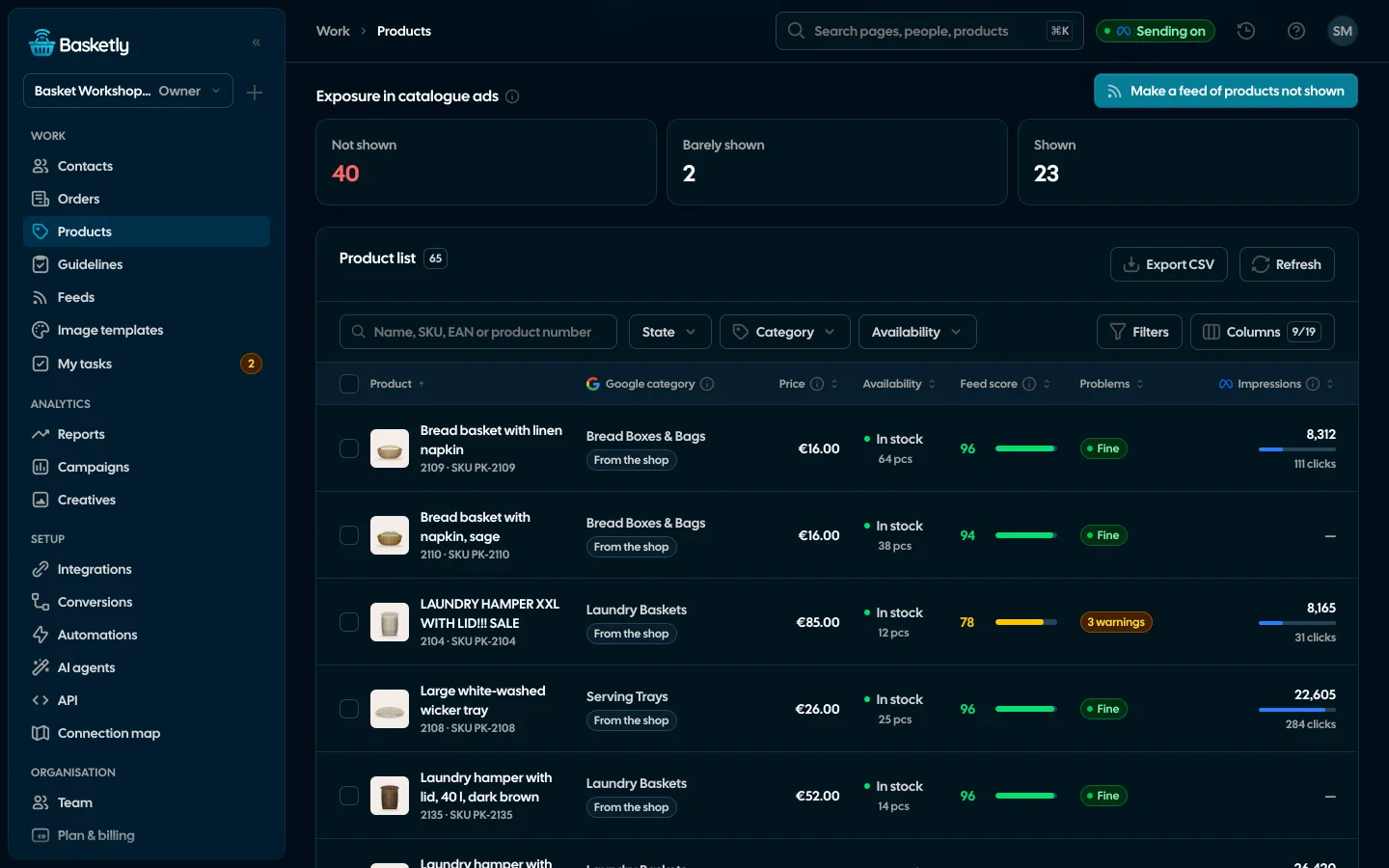
In Merchant Center itself you see the reasons only after Google has processed the feed. Before the feed gets there you can check it yourself. In Basketly the Products page does this:
- Every product from Shoper, IdoSell, BaseLinker, WooCommerce and Shopify, and from feeds, has a 0-100 score and the result of 44 checks against Merchant Center and Meta catalogue requirements. Checks carry a weight: error (that side will refuse the product), warning (delivery weakened or at risk), tip.
- The refused and weakened tiles filter the list. The "problem" filter shows every product with one specific flaw, e.g. an incorrect GTIN, with the count of such products.
- The Guidelines page holds 50 rules from Google, Meta, TikTok and Pinterest, each with a link to the vendor's page and a check date. Each rule shows how many of your products break it, and the number leads to the list of those products. Details in the article on product data guidelines.
What you will see: you open Products, click the "refused" tile, pick the "GTIN" problem and see a list of products to fix with the value that is wrong.
What fixes itself, and what we cannot invent
The Feeds page serves a corrected feed at its own address (to paste into Merchant Center and the Meta catalogue) and applies automatic fixes before your rules run:
- removes a GTIN Google would refuse (wrong check digit or length, the shop's internal range),
- sets availability to Google's values, and from stock quantity if the feed gives one,
- removes a sale price that is not lower than the price,
- writes prices in Google's format, and repairs titles (HTML, emoji, promotional phrases, capitals) and descriptions.
Missing values are never made up, and the product id never changes. For products you know have no identifiers you can store a manual fix identifier_exists = no. Broader rules (e.g. adding the brand to the title) are set in the Fixes and rules tab. We write about feeds and rules on the Product feeds page.
What Basketly will not do
- It will not invent a GTIN. It points out products with no code or with a wrong code. The real code has to come from the manufacturer or your system.
- It will not undo a disapproval over a price the shop does not show. It repairs the feed, but prices and availability must match the product page. If the shop shows a different price from the feed's source, fix it in the shop.
- It will not appeal a suspended Merchant Center account (for example for misrepresentation) and will not tell you what Google flagged. That is an assessment of trust in the shop, not a file error. Product checks can remove some causes, nothing more.
- It will not speed up verification on Google's side.
A habit that prevents the next round
Disapprovals usually return after a change in the shop: a new price list, a supplier import, a batch of new products without barcodes. Two habits keep the count low. First, check product errors after every large import, not only when impressions fall. Second, keep one owner of the feed's source, so that a price changed in the shop is the same price the feed serves. If you are still choosing which shop data to connect and in what order, shop integrations: where to start lays out the sequence.
Next step
Open product diagnostics in Merchant Center and count which reason affects the most items. To see the product score and the problem list without counting by hand, open the demo. To check your own products, create an account and connect your shop; plan limits are on the pricing page. If Meta catalogue ads do not show some products, see products not shown in catalogue ads.
Sources
- Google Merchant Center Help: Product data specification (price and availability matching the page, GTIN,
identifier_exists, required attributes) - Google Merchant Center Help: GTIN (where to find a GTIN, not every product has one)
- Google Merchant Center Help: Missing or incorrect GTIN (disapproval, the exception for custom-made goods, 3-5 business days for verification)
- DataFeedWatch: Limited performance: missing GTIN (SKU used as MPN)
- r/PPC: thread on product disapprovals
About the author
Aleksander
Founder of Basketly.io, BooksyAudit.pl and SMSPortal.app
Founded Basketly.io, BooksyAudit.pl and SMSPortal.app. In the knowledge base he explains how to send shop purchases to Meta, how to keep a product catalogue in shape and how to measure what a purchase from ads costs.
All articles by the authorFrequently asked questions
Does every product need a GTIN?
Not every one. Google says custom-made products such as art or handmade goods do not need a GTIN, and the attribute page notes that not all products have one. When a product has a manufacturer-assigned GTIN, give it correctly: an incorrect GTIN ends in disapproval. For products without identifiers you set identifier_exists to no, but only when they really have none.
Where do I get a GTIN?
From the product packaging (the barcode with its number) or from the manufacturer or distributor. Google advises asking the manufacturer when you cannot find it. Do not guess or generate numbers: Google says to provide a GTIN only when you are sure it is correct.
Will Basketly invent a missing GTIN?
No. Basketly points out products with no GTIN and with an incorrect GTIN, removes from the feed a GTIN that Google would refuse (wrong check digit or length, the shop's internal range), but it does not buy a code or guess one.
How long does re-verification take after a fix?
According to Google's help, after you update products verification can take 3-5 business days. So fix in whole groups, not one product at a time.
Does a price mismatch really cause disapproval?
The product data specification requires the price and currency in the feed to match the price on the product page and the product to be purchasable at that price. A mismatch is one of the more common errors agencies describe. It usually comes from a stale feed, a promotion in the shop, or a net versus gross difference.
Does the same apply to the Meta catalogue?
Largely yes: Meta also requires price, availability, link, image and identifiers, among others, but with its own rules. Basketly checks each product against both sides at once and marks which side a problem concerns.