
Black Friday ad images from your product feed: 2026 calendar, formats and the 30-day price
Black Friday is 27 November 2026. How to make catalogue ad images from your feed: season dates, four formats, the 30-day lowest price and the Merchant Center trap.
On this page
Key facts (as of 2026-10-30)
- Black Friday 2026 is Friday 27 November, Cyber Monday Monday 30 November.
- A Basketly template draws an image per product in four formats: 1080×1080, 1080×1350, 1080×1920 and 1200×628.
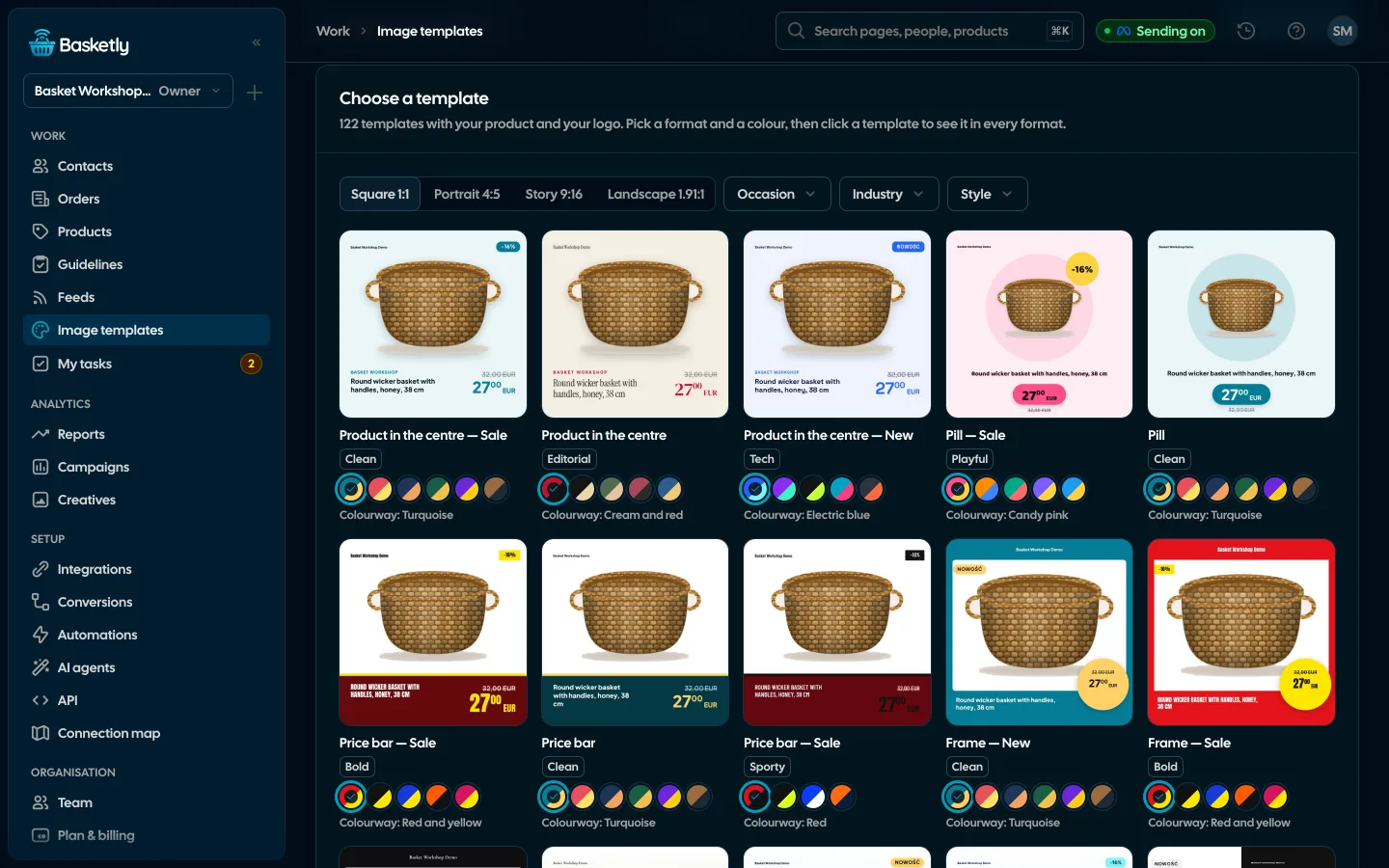
- The gallery has 122 ready designs, with occasions including Black Friday, Cyber Monday, Christmas and St Nicholas Day.
- The line "Lowest price of the 30 days before the reduction" appears on the image when the product has a
lowest_priceattribute; Basketly does not calculate it. - Google Merchant Center does not accept promotional overlays on the main image. Send promotional images in the feed to Meta only.
Black Friday is 23 days away. Catalogue ads with prices and "-30%" badges are easy with 20 products. With 2,000 products, drawing by hand stops being an option. This article shows how to prepare images from the feed once, in four formats, without breaking price rules and without trouble in Merchant Center.
The 2026 season calendar
The dates come from the calendar, not from our forecasts.
| Date | Occasion |
|---|---|
| Friday 27 Nov | OccasionBlack Friday |
| Monday 30 Nov | OccasionCyber Monday |
| Sunday 6 Dec | OccasionSt Nicholas Day (Mikołajki) |
| Thursday 24 Dec | OccasionChristmas Eve |
Practical advice: have the templates ready a day before the first campaign, not on launch day. Meta has to fetch the feed with changed images, and you want to see the result before you spend budget. An image in Basketly carries a version number in its address that changes with the template and the product's attributes, so Meta and Google fetch the new image after a change.
Four formats, one template
A catalogue ad has several frames and each needs its own layout.
- Square 1080×1080: the most universal.
- Portrait 1080×1350: takes more room on a phone screen.
- Story 1080×1920: full screen. Text and badges must stay outside the top 14% and bottom 22%, where the Instagram and Facebook interface covers the image.
- Landscape 1200×628: for Performance Max.
Basketly gallery designs have a separate layout per format: in landscape the text sits beside the product, in story it keeps to the safe zone. You do not redo one image four times.
The 30-day price on a discount image
An image saying "-30%" is a price-reduction announcement. UOKiK describes that for a reduction you show the lowest price of the 30 days before it next to the current price, in advertising too. In its Black Friday release the authority adds that a percentage discount is counted from that lowest price, not from an inflated "reference" price.
This is not legal advice. If your case is unusual (long promotions, discount codes, products newer than 30 days), check UOKiK's explanations or ask a lawyer.
What Basketly does:
- When a product has a
lowest_priceattribute, the struck price, the discount and the saving are counted from it, and the image shows the line "Najniższa cena z 30 dni przed obniżką: 180,00 zł" (the line is in Polish, the language of the Polish market). - Every gallery design with a discount shows that line. Without the attribute it is hidden.
- A sale price that is not below
lowest_priceshows no reduction at all.
What Basketly does not do: it keeps no price history and does not calculate lowest_price itself. The attribute has to come from the shop's feed or a feed rule. Check it on a few products before launch.
The trap: Merchant Center dislikes promotional images
Google's help requires that only the product is visible on the main image, with no promotional elements, overlays or watermarks. Text with a price or a call to action on the photo ends in a disapproval.
The "Image from template" action in feed rules replaces image_link. So:
- Keep the feed for Merchant Center on plain product photos.
- For the Meta catalogue make a separate feed: on its page choose "Make a copy" (Utwórz kopię) and add a rule with the "Image from template" action to the copy.
Other reasons for product disapprovals in Merchant Center are covered in the article on GTIN and price. Same product base, two outputs, each following its recipient's rules. We cover both sides' requirements in the article on product data guidelines.
How to do it in 45 minutes
- Image templates → Gallery. Filter the occasion to Black Friday, pick a design, format and colourway. One click makes a copy in My templates and opens the editor.
- Preview on products. Under the canvas unfold the strip and look at the image for six products: long name, no sale, high price. Text that is too long is shrunk to the set minimum and then cut with an ellipsis.
- Logo and colours. Upload a logo (one per organisation) and check the colourway. When a product is not on sale, the discount badge is not shown.
- Sale end text. The
{sale_end_text}field builds "Promocja do 30.11" from the end date of the sale price in your feed. - A separate feed for Meta. "Make a copy", a rule with the condition "sale price not empty" and the action "Image from template". The feed preview shows which products were changed.
- After launch. In "Image templates → Results in ads" compare templates over the last 7, 30 or 90 days.
If catalogue ads do not show some products, the cause is usually in the data, not the image: see products not shown in catalogue ads.
Checklist before publishing
Go through it the day before the first campaign.
- The image in each of the four formats looks good for a product with a short and with a very long name.
- A product without a sale shows no discount badge.
- A product on sale has
lowest_price, and the discount is counted from it. - The sale-end text matches the date in the shop.
- The Merchant Center feed still has plain photos, without overlays.
- The Meta feed has been fetched after the change and shows the new images.
- The link in the product leads to a page with the same price as on the image. A price mismatch is the simplest reason for disapprovals and customer complaints.
What Basketly will not do here
- Video or lifestyle photos. It draws images from product data and the product photo. "Photo-led" designs use additional photos you already have in the feed.
- Calculate the 30-day price. See above.
- Guarantee a result. The "Results in ads" tab shows impressions and CTR as Meta reports them, summed for every product of the feeds that use the template, including ones the rule did not match. It compares templates; it does not prove a template sold.
- Launch a Meta campaign. It prepares images and the feed; budgets and campaigns you set yourself.
Limits: 50 templates per organisation, photos up to 15 MB.
Next step
Open the gallery and pick one Black Friday design in four formats: 10 minutes. To see the gallery on demo products, open the demo. To make images from your own feed, create an account; the free plan has an order limit described in pricing. The whole feature is on the Image templates page, feeds on Product feeds, and connecting the Meta catalogue to a feed on Meta catalogue.
Sources
- UOKiK, consumer rights: Informacje o obniżkach cen (lowest price of 30 days, in advertising too; Polish)
- UOKiK: Clear prices on Black Friday (release of 20 November 2023: discount counted from the lowest price, where it must appear)
- Google Merchant Center Help: Image link
image_link(no promotional elements and overlays on the main image, minimum sizes; Polish)
About the author
Aleksander
Founder of Basketly.io, BooksyAudit.pl and SMSPortal.app
Founded Basketly.io, BooksyAudit.pl and SMSPortal.app. In the knowledge base he explains how to send shop purchases to Meta, how to keep a product catalogue in shape and how to measure what a purchase from ads costs.
All articles by the authorFrequently asked questions
When are Black Friday and Cyber Monday in 2026?
Black Friday is the Friday after the fourth Thursday of November, so 27 November 2026. Cyber Monday is the Monday after, 30 November. St Nicholas Day is 6 December and Christmas Eve 24 December. Prepare images early: every image change in a catalogue ad goes through Meta fetching your feed.
What image sizes do catalogue ads need?
Basketly templates draw four formats: square 1080×1080, portrait 1080×1350, story 1080×1920 and landscape 1200×628 (for Performance Max). Each gallery design has its own layout per format, and in the story format text and badges stay outside the top 14% and bottom 22% that the Instagram and Facebook interface covers.
Do I have to show the lowest 30-day price on a discount image?
According to UOKiK (the Polish consumer authority), a seller announcing a reduction shows the lowest price of the 30 days before it next to the current price, in advertising too. This is not legal advice: if in doubt, check UOKiK's explanations or ask a lawyer. Basketly adds that line to the image when the product has a lowest_price attribute.
Does Basketly calculate the lowest 30-day price itself?
No. The template uses the lowest_price attribute, which has to come from the shop's feed or be set by a feed rule. Basketly keeps no price history of its own. Without the attribute the lowest-price line stays hidden and the discount is counted from the regular price.
Can I use the same images in Google Merchant Center?
Not as the main image. Google's help says the image must not contain promotional elements or overlays and that only the product should be visible on the main image. Send images with price and badge only in the feed to the Meta catalogue and keep the Merchant Center feed on plain photos.
Will a ready template make my ads sell more?
We do not promise that. A template saves hours of drawing, but results depend on offer, price and campaign. The Results in ads tab shows impressions and CTR as Meta reports them for each template, so you can compare templates with each other.